

What is the Real Cost of EHR Migration Downtime for a Chiropractic Practice?
The real cost of EHR migration downtime isn't in the contract your software vendor sent you. It's in the reconciliation gap — the window between when your new system goes live and when your revenue actually recovers.
That gap is longer than most practice owners expect. Staff productivity drops by as much as 50% during the transition period. The EHR Transition & Data Integrity Study consistently identifies data mapping errors and financial continuity failures as the highest-risk outcomes — not system crashes, not data loss. The financial connective tissue: unlinked ERAs, denied claims with no follow-up queue, and billing identities that never got re-authenticated at the clearinghouse.
For a chiropractic practice, that reconciliation gap can run 30 to 180 days before the full damage is visible. During that window, the system looks fine. Claims show “Sent.” Staff feel productive. The new software is clean and modern and fast.
Meanwhile, the bank account tells a different story.
The EMR Software Cost 2026 Guide reports that 83% of EHR projects exceed their original budgets — and that’s before factoring in the revenue you’re not collecting while the practice stabilizes. Implementation and data migration fees alone typically run $1,000 to $20,000 beyond the subscription price. That’s the visible line item. The invisible one is the AR you aren’t working because your team is still figuring out where the denial queue lives.
This article covers what actually happens to your revenue during an EHR switch, why the standard vendor migration process doesn’t protect you, and what a forensic approach to the first 30 days looks like in practice.
Last Updated: April 20, 2026
- The Reconciliation Gap: What Actually Breaks During an EHR Migration
- The Hidden Costs Your Vendor Didn’t Mention
- Who Carries the Risk When the Migration “Succeeds”
- The First 30 Days: How to Protect Revenue During the Transition
- Frequently Asked Questions
- How long does the productivity dip typically last after a chiropractic EHR switch?
- What are the most common hidden fees in an EHR migration contract?
- Can a software migration cause me to lose my existing Accounts Receivable?
- Why does my new EHR say claims are “Sent” if my bank deposits are dropping?
- Is it cheaper to keep my old server for a few months after moving to the cloud?
- What’s the difference between a “fast migration” and a “safe migration”?
- How do I know if my post-migration billing is actually working?
- The Migration Worked. Your Revenue Didn’t.
The Reconciliation Gap: What Actually Breaks During an EHR Migration
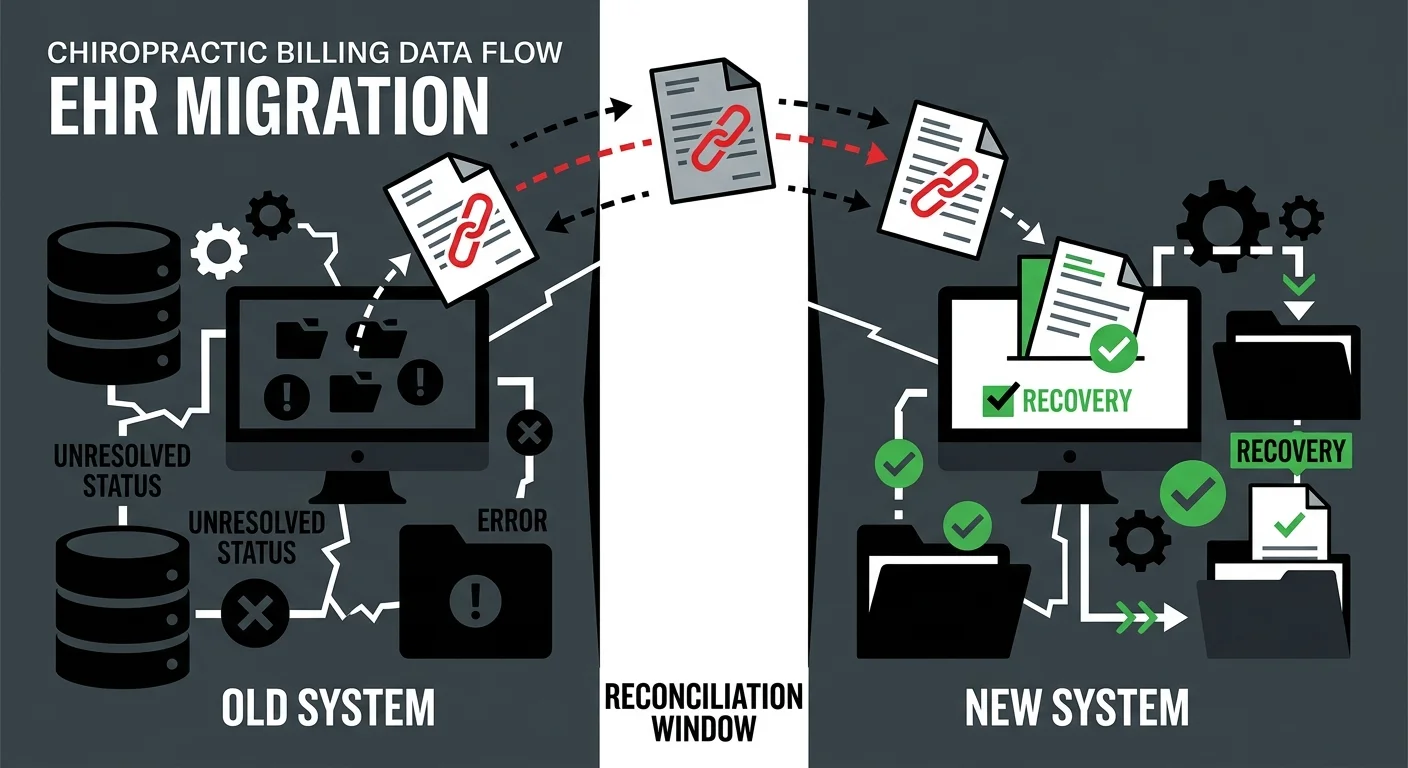
Most practices go into an EHR migration watching the wrong things.
The go-live date. Whether the schedule transferred. Whether patient records are accessible in the new interface.
None of that tells you whether you’re going to get paid.
When a practice’s full-service chiropractic billing operation is functioning correctly, the signals are consistent: claims go out, ERAs come back matched, denials get worked, deposits land on schedule. A migration disrupts every one of those signals simultaneously — and the standard vendor handoff doesn’t account for any of them.
Why “Migration Complete” and “Revenue Restored” Are Not the Same Thing
Your EHR vendor calls the migration complete when your data is in the new system.
That’s a technical milestone. It has nothing to do with cash flow.
What actually determines whether revenue continues is whether the financial connective tissue of your billing survived the transfer. Your vendor moved your records. They didn’t move your billing relationships, your clearinghouse credentials, or your denial follow-up workflows. Those require deliberate action — and most practices don’t take it because nobody told them to.
Here’s what that connective tissue actually includes:
- Trading Partner ID re-authentication (the billing identity your clearinghouse uses to route and process claims — if this isn’t re-established, claims pass internal validation and die at the clearinghouse with no visible error on your dashboard)
- ERA linkage (the electronic remittance advice that matches payments to claims — broken ERA links mean payments are posting to your bank without clearing your AR, creating an invisible balance of “unlinked” revenue that nobody is working)
- Denial queue mapping (any denial that existed in your old system and didn’t import cleanly into the new workflow is now an orphaned claim — nobody works it because nobody can see it)
- Package and macro logic (the documentation shortcuts your staff built over years — these don’t transfer, and rebuilding them takes weeks, during which billing errors quietly accumulate)
The EHR Transition & Data Integrity Study shows that data mapping failures and financial continuity breakdowns are the primary risk in EHR transitions — not hardware failures, not lost records. This is a billing problem. And billing problems don’t fix themselves.
The Silent Success Window
Here’s what makes this particular risk so damaging: the first 30 to 60 days after go-live usually feel fine.
The new system is faster. The interface is cleaner. Staff are figuring things out and getting better every week. Claims are going out — the dashboard says “Submitted.”
What the dashboard doesn’t say is whether those claims are actually reaching the payer.
It doesn’t surface the orphaned denial from Week 1 that fell out of the workflow and never got touched. It doesn’t flag the Trading Partner ID that silently rejected 40% of submissions at the clearinghouse level. It doesn’t show the ERA files that stopped linking correctly after the migration, leaving a growing pile of unmatched payments sitting in limbo.
The practice looks healthy. The bank account disagrees.
By the time the cash flow drop becomes undeniable — typically 60 to 90 days out — some of that revenue is already gone. Most commercial payers enforce timely filing windows of 90 to 180 days. A claim that fell through in Week 2 of your migration may be past the point of appeal before anyone realizes it’s missing.
The billing industry measures a “successful migration” by submission speed and claim volume. If claims are going out fast and the count looks right, the migration gets marked complete. That metric optimizes for throughput — not for actual payment. Submission is not billing. Getting paid is billing.
The Hidden Costs Your Vendor Didn’t Mention
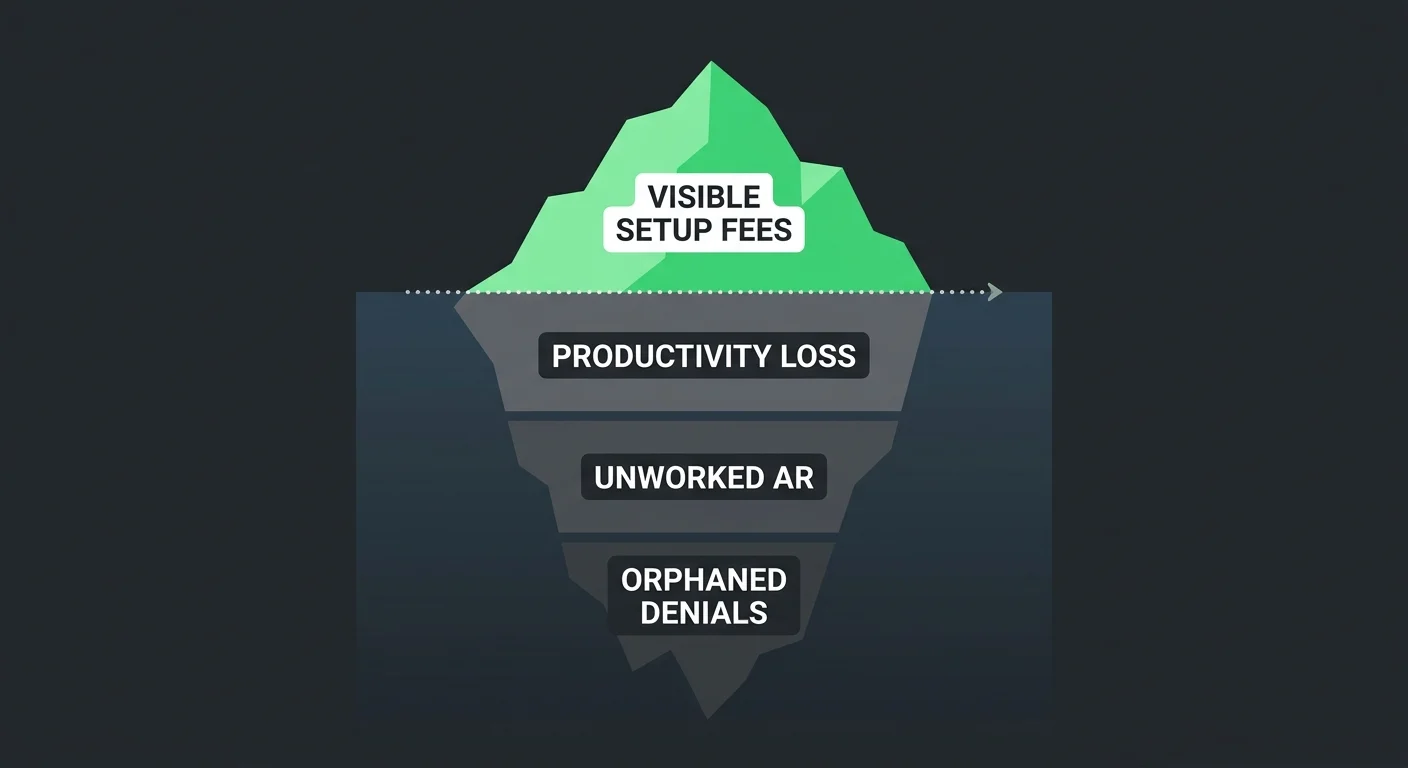
Every EHR contract has a cost section. It lists setup fees, migration fees, training packages, monthly subscription tiers.
None of those line items reflect what a migration actually costs a practice.
Beyond the Setup Fee: What Migration Actually Costs
The EMR Software Cost 2026 Guide puts implementation and data migration fees at $1,000 to $20,000 beyond the subscription price. That number shows up in vendor conversations. It gets treated as the total exposure.
It isn’t.
| Cost Category | Visible in Contract | Estimated Range | Timing |
|---|---|---|---|
| Setup and data migration | Yes | $1,000–$20,000 | Pre-go-live |
| Historical data extraction | Sometimes | $500–$5,000 | Pre-go-live |
| Clearinghouse re-enrollment | Rarely | $200–$2,000 | Go-live to 30 days |
| Additional staff training hours | Rarely | 20–60 hours | 30–90 days |
| Productivity loss (reduced patient volume) | Never | 20–40% reduction | 30–60 days |
| Unworked AR during transition | Never | Practice-specific | 30–180 days |
| Unlinked ERAs and orphaned denials | Never | Practice-specific | Ongoing if unaddressed |
The bottom three rows are where practices actually get hurt. No vendor quantifies them because no vendor is obligated to. But they determine whether the migration was affordable — or quietly catastrophic.
- Productivity loss (staff retraining period) — Most practices absorb a 20 to 40% reduction in patient volume capacity during the first 30 to 60 days. Staff are learning new workflows, rebuilding documentation habits, and figuring out where things live in the new system. Billing throughput slows with them.
- Unworked AR (the backlog that builds in silence) — Denial follow-up and secondary billing slow down or stop entirely during the retraining window. MGMA Financial Management identifies reconciling patient ledgers and unapplied credits as the most critical step in preventing post-migration AR aging — and it’s the step most practices skip or delay because they’re too busy stabilizing everything else.
- Orphaned denials (the permanent revenue leak) — Any denial that existed in your old system and didn’t map cleanly into your new workflow becomes invisible. Nobody works it. If it ages past timely filing limits, the revenue is gone — not delayed, gone.
The Credential Reset No One Prepares You For
There’s a specific failure pattern Bushido sees repeatedly in post-migration billing reviews that almost never gets disclosed by vendors.
Clearinghouse re-enrollment.
When you switch EHR systems, your Trading Partner ID — the billing identity your clearinghouse uses to authenticate and route claims — must be re-established for the new platform. This doesn’t happen automatically. It requires deliberate action, it has a processing window, and it takes time you may not have budgeted for.
During that window, claims leave your new system looking clean. They reach the clearinghouse. The clearinghouse doesn’t recognize the credential. The claim goes nowhere.
Your dashboard shows full submission volume. Your bank deposits drop. Nothing in your interface explains the gap.
This is one of the most preventable failure mechanisms in an EHR migration. It’s also one of the most common — because nobody told the practice to check it, and the vendor’s job was done when the data transferred.
Who Carries the Risk When the Migration “Succeeds”
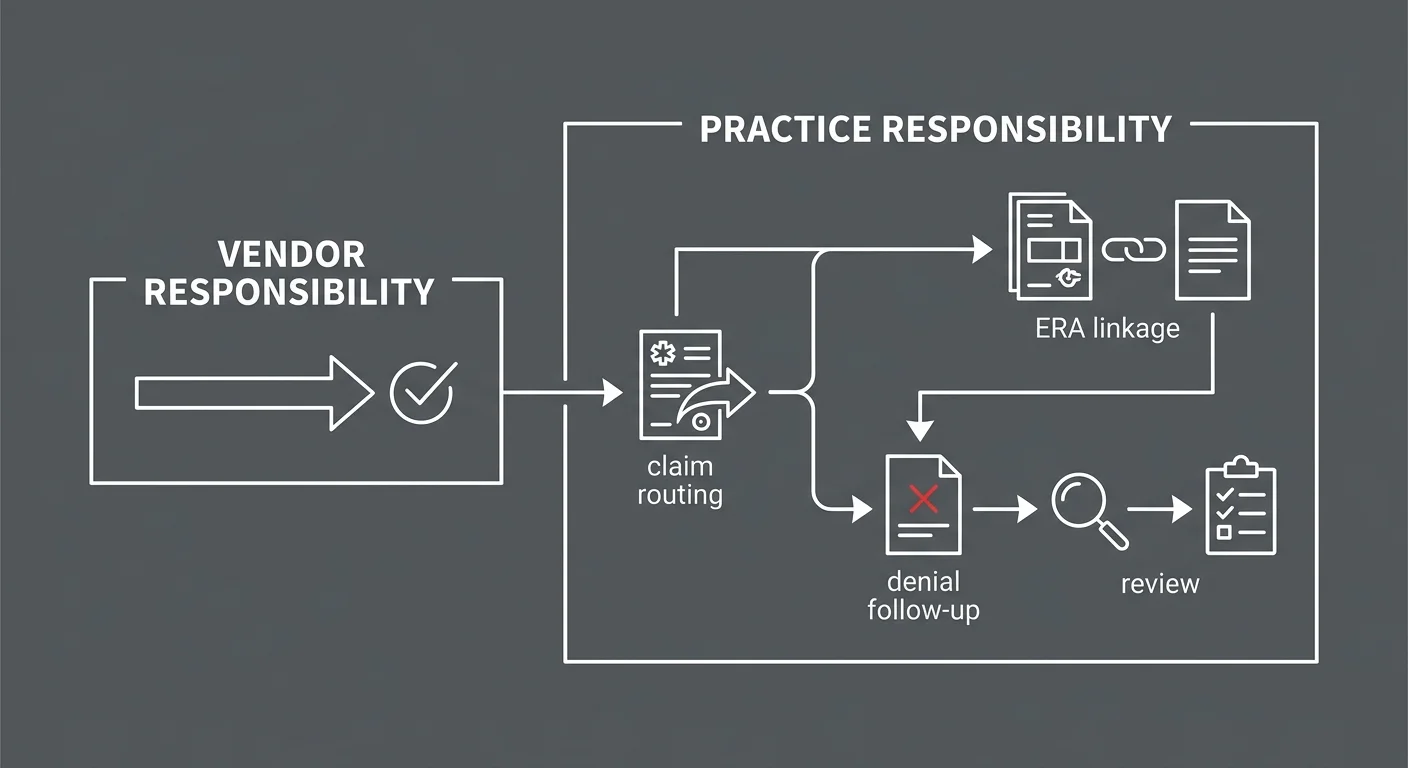
The practice carries the risk.
That’s not an indictment of EHR vendors. It’s a structural fact. Their obligation ends at data transfer. Your revenue is outside their scope.
What Your Software Vendor Is Actually Responsible For
EHR vendors are contracted to move your clinical and administrative records from one system to another. That’s the job.
They are not responsible for:
- Whether your payer enrollments carried over correctly
- Whether your clearinghouse re-enrollment was completed before go-live
- Whether your billing staff can produce accurate claims in the new environment
- Whether denials from Week 1 were worked in Week 3
- Whether your AR aging report in the new system actually reflects your receivables
The Deloitte EHR Migration Risk Framework identifies financial reconciliation as the most frequent point of failure in EHR implementations, attributing it directly to inadequate billing data mapping during transfer. That gap is yours to close — not your vendor’s.
Most practices don’t close it. They assume that “migration complete” means billing is intact.
It doesn’t.
The Automation Gap Nobody Talks About
This is where the risk compounds for practices running automation-forward or volume-first billing models.
Automated billing logic — rules-based scrubbing, auto-routing, workflow triggers — is built on top of a specific system architecture. When you change systems, you’re not just changing the interface. You’re replacing the foundation those rules run on.
Automation-forward models don’t rebuild that architecture manually. They rebuild it using the new system’s default logic. That default logic doesn’t know your primary payer’s specific documentation requirements. It doesn’t know the claim pattern that reliably gets your manual therapy covered. It doesn’t flag the 15% of claims that require a human judgment call because they sit outside the standard rules.
The industry’s default explanation for billing failure during a migration is that the software caused it. That explanation is convenient and wrong. The software isn’t the problem. The absence of a skilled billing partner who knows your practice is the problem. Blaming the software is how billing companies avoid accountability for the revenue that disappeared during the switch.
Practices with dedicated human billers before the migration have someone who notices when the new system’s output doesn’t match expectations. They catch it in Week 1. Practices running automation-forward models find out when the cash flow drops in Week 8.
This Approach Isn’t Right for Everyone
If you want a billing partner who completes the system switch, sends you the login credentials, and measures success by submission volume — that’s not what we do.
If a dashboard full of green checkmarks is enough reassurance, without knowing what percentage of those submitted claims actually converted to deposits — this isn’t the right fit.
Protecting revenue through an EHR transition requires active human oversight during the highest-risk window. It requires treating the first 30 days as a forensic review, not a celebration. If that level of engagement isn’t what you’re looking for, the hidden costs outlined above will likely remain hidden — until they surface as a cash flow crisis.
The First 30 Days: How to Protect Revenue During the Transition
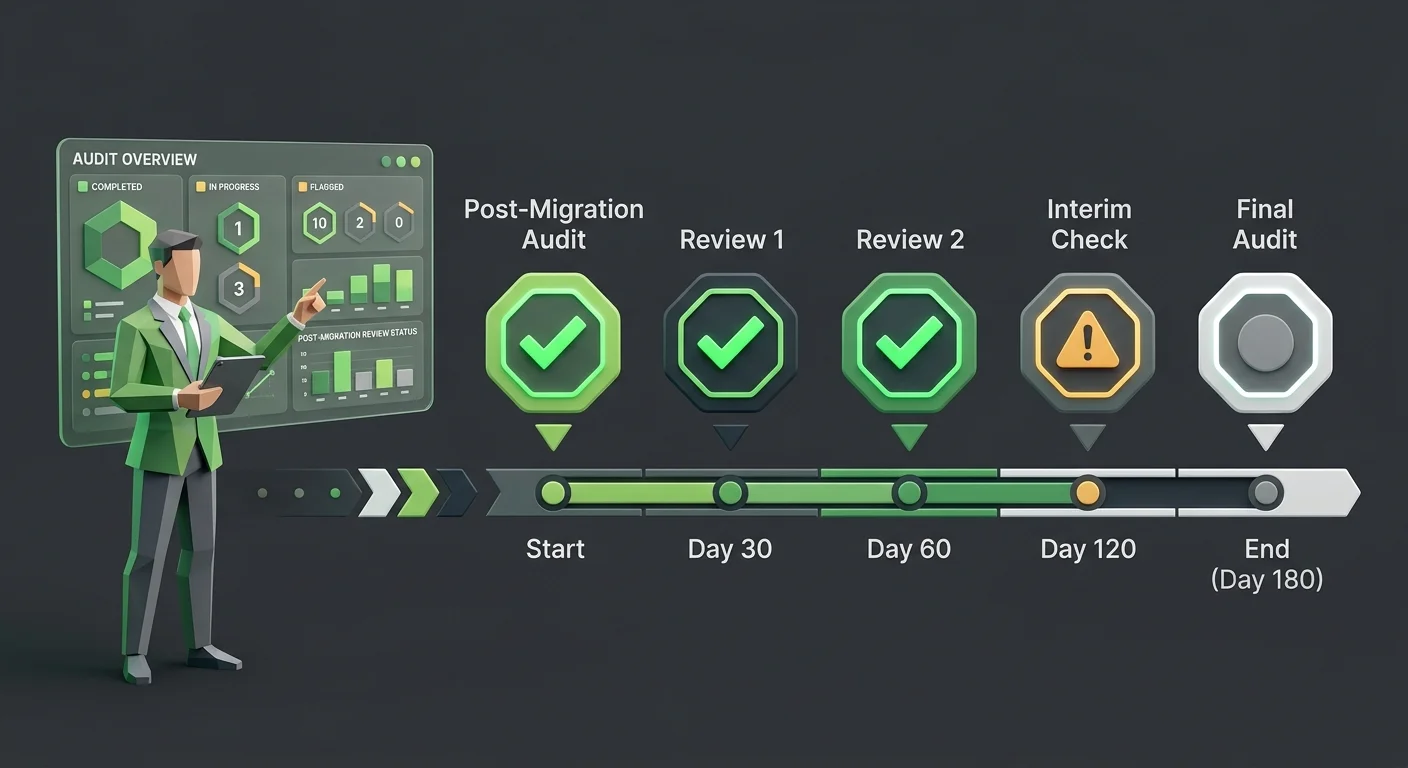
The 30 days after go-live are not a stabilization window.
They’re an audit window.
Every day that passes without active reconciliation is another day orphaned claims, broken ERA links, and unworked denials age toward unrecoverability. The billing software compatibility you’re operating on is only as reliable as the oversight layer running above it — and during a migration, that layer is where everything either holds together or falls apart.
The Post-Migration Audit Framework
A forensic approach to the first 30 days means tracking the delta between what your system says it submitted and what your bank account is actually receiving — and investigating every gap before it ages past the point of recovery.
The specific checkpoints:
- Day 1–3: Clearinghouse authentication — Confirm your Trading Partner ID has been re-enrolled and that submissions from the new system are reaching the payer. Run a test claim and trace it end-to-end through the clearinghouse before assuming the pipeline is intact.
- Day 3–7: ERA linkage verification — Confirm that remittance files from payers are linking correctly to claims in the new system. Any unlinked ERA means payments are posting to your bank without clearing your AR — creating invisible revenue that will cause a reconciliation disaster later.
- Day 7–14: Denial queue audit — Pull every denial from Week 1. Verify each one mapped to an active work queue. Any denial that doesn’t appear is orphaned. Work it manually and document it as a migration gap.
- Day 14–30: AR reconciliation — Compare your AR aging report from the legacy system against the new system’s report. Gaps represent claims that didn’t migrate cleanly. Each gap requires individual investigation.
- Day 30–180: Legacy server access — Keep your old server or vendor legacy portal active as a read-only source of truth for at least 180 days. It’s the most cost-effective way to resolve pre-migration balance disputes without guesswork.
| Audit Checkpoint | Timeline | What You’re Protecting | Risk If Skipped |
|---|---|---|---|
| Clearinghouse re-authentication | Day 1–3 | Claim submission integrity | Silent rejections from go-live forward |
| ERA linkage verification | Day 3–7 | Payment-to-claim matching | Invisible unlinked revenue in AR |
| Denial queue audit | Day 7–14 | Denial follow-up continuity | Orphaned claims aging past timely filing |
| AR reconciliation | Day 14–30 | Full ledger integrity | Permanent revenue gaps in new system |
| Legacy server access | Day 30–180 | Historical dispute resolution | Unresolvable balance disputes |
Why a Human Billing Partner Changes the Outcome
That framework is manageable with the right partner.
Running it while also operating a practice is nearly impossible.
A dedicated biller who knows your claim patterns, your payer mix, and your documentation habits will catch a clearinghouse authentication failure on Day 1 — not Day 45. They’ll identify broken ERA links before they turn into a reconciliation disaster. They’ll work the denial queue manually when the new system’s automation falls short of your edge cases.
This is exactly where a human biller becomes necessary to fix ChiroTouch Cloud migration errors. Not because the software is defective. Because the software doesn’t know your practice — and during a migration, that gap costs real money.
For practices currently in a ChiroTouch Cloud transition, understanding why the migration is causing billing interruptions is the right starting point before building any revenue defense strategy.
If go-live has already passed and you’re not sure what you missed, auditing your EHR data migration for revenue leakage is where to begin. Claims and ERA links from the first 30 days are still workable — but that window closes, and it closes fast.
Frequently Asked Questions
How long does the productivity dip typically last after a chiropractic EHR switch?
Most practices experience a 20 to 40% drop in patient volume capacity for the first 30 to 60 days as staff learn new workflows and rebuild the documentation shortcuts and macro logic that the migration stripped out. The productivity recovery timeline depends heavily on training quality and whether the practice has a dedicated billing resource actively monitoring output during the transition — or is discovering problems reactively.
What are the most common hidden fees in an EHR migration contract?
Beyond the setup fee, practices frequently encounter unexpected charges for historical data extraction (pulling structured records from legacy databases), third-party clearinghouse re-enrollment, and additional staff training hours that exceed the onboarding package. These costs are rarely itemized upfront. The more significant hidden costs — productivity loss, unworked AR, and orphaned denials — don’t appear in any contract at all because they’re not the vendor’s liability.
Most of what the migration actually costs your practice never shows up on an invoice.
Can a software migration cause me to lose my existing Accounts Receivable?
Technical data is rarely “lost” in the literal sense. What gets lost is the connective tissue — the links between claims, payments, and denials that make your AR workable. Unlinked ERAs, unmapped denials, and unapplied credits from the migration period can make significant portions of your AR effectively invisible in the new system. The revenue exists, but nobody can act on it because it doesn’t appear in the workflow. MGMA Financial Management identifies reconciling patient ledgers and unapplied credits after a migration as the most critical step in preventing post-migration AR aging — and it’s the step that gets skipped most often.
For a closer look at the specific failure patterns, common data transfer errors in chiropractic EHR migrations covers what breaks and why.
Why does my new EHR say claims are “Sent” if my bank deposits are dropping?
This is the clearinghouse authentication failure. When you switch EHR systems, your Trading Partner ID — the billing identity your clearinghouse uses to route and process claims — must be re-established for the new system. If that re-enrollment didn’t happen, claims pass your new system’s internal validation (hence “Sent”) but fail at the clearinghouse. The clearinghouse doesn’t recognize your credential. The claim goes nowhere. Your system dashboard never shows the rejection because it happened downstream.
If you’re seeing this pattern, confirm your clearinghouse re-enrollment status immediately and trace a recent submission end-to-end. Before your next transition, reviewing tips and tricks for switching chiropractic EHR software can help you build a pre-go-live checklist that closes this gap before it opens.
Is it cheaper to keep my old server for a few months after moving to the cloud?
Yes — and it’s not just cheaper, it’s often essential. Keeping your legacy server active as a read-only source of truth for at least 180 days post-migration is the most reliable way to resolve pre-migration patient balance disputes, reconcile AR gaps, and verify claim history without guesswork. The cost of maintaining legacy access is almost always lower than the cost of the disputes you can’t resolve without it. This is especially relevant for practices moving from on-premise systems to cloud platforms, where the legacy data environment becomes inaccessible once the contract ends.
What’s the difference between a “fast migration” and a “safe migration”?
Fast migrations prioritize go-live speed: data transferred, system live, staff onboarded. Safe migrations prioritize revenue continuity: clearinghouse re-enrolled, ERAs linked, denial queues mapped, AR reconciled.
These aren’t the same objective — and they don’t run on the same timeline.
A fast migration closes the vendor’s implementation contract. A safe migration protects your cash flow. When those two timelines conflict, the vendor’s schedule wins — unless someone external is actively advocating for revenue continuity throughout the process.
How do I know if my post-migration billing is actually working?
The single most reliable indicator is the delta between submission volume and payment volume. If claims submitted in Week 1 aren’t producing deposits by Week 4 to 6 — accounting for normal payer processing time — something is broken.
Secondary indicators: a denial rate higher than your pre-migration baseline, AR aging claims sitting in the 60-to-90-day bucket without clear follow-up status, ERA reports that don’t match expected payment amounts.
Any of those patterns warrants an immediate audit — not a call to your software vendor.
The Migration Worked. Your Revenue Didn’t.
What Comes Next
If your practice completed an EHR migration in the last 90 to 180 days, there’s a reasonable chance revenue was disrupted. Not because anything went obviously wrong — but because the things that actually determine cash flow continuity are invisible until they become a problem.
ERA links. Denial queues. Clearinghouse credentials. Payer enrollments. None of these rebuild automatically. None of them are your vendor’s problem. All of them are yours.
The practices that come through a migration without a permanent revenue gap are the ones that treated Day 1 like an audit — not a celebration. The practices that don’t recover fully are the ones that took “migration complete” at face value.
Submission is not billing. Getting paid is billing.
If your system says the claims went out but your bank account says otherwise, someone needs to find out why — before timely filing limits turn a recoverable gap into a permanent loss.
The difference between a migration that costs $5,000 and one that costs $50,000 isn’t the software. It’s whether anyone was watching the revenue while the transition happened.
Knowing your system went live is one thing. Knowing your billing survived is different.
A practice assessment reviews your full billing operation — not just submission volume — and shows you what recovered, what’s still workable, and what may have already slipped past the point of return.
See how your post-migration billing actually stacks up.
The longer orphaned claims sit unworked, the fewer of them cross back into recoverable territory.

© 2026 Bushido Billing. All Rights Reserved | Web Design by iTech Valet