

Is Your Chiropractic EHR Data Migration HIPAA Compliant?
HIPAA compliance during a chiropractic EHR migration is not limited to data encryption. True compliance requires a documented forensic reconciliation — one that confirms your clinical records, billing history, and "unlinked" data artifacts remain accessible for the mandatory six-year federal retention period.
Most migration failures aren't security breaches in the traditional sense. They're documentation gaps. A technically successful migration that strips AT modifier history, flattens patient ledgers, or buries SOAP notes in an inaccessible legacy format is a compliance failure — even if nothing was "hacked."
The question isn't whether your new EHR is HIPAA-certified. The question is whether the data inside it tells a complete, defensible story from your first patient visit to your last. Those are two different things, and most migration checklists only verify the first one.
There are three categories of failure that create the most exposure: clinical documentation gaps that make Medicare claims indefensible, ledger integrity failures that orphan financial history, and compliance record inaccessibility that leaves practices without documented evidence of their own compliance history. Each one can surface years after the migration is considered complete — during an audit, a payer dispute, or a patient records request.
The compliance obligation also extends to where your data lives. State-level storage mandates, Security Risk Assessment requirements triggered by a system change, and the specific retention rules governing chiropractic documentation all factor into whether a migration is truly compliant — or just technically finished.
This article covers what a compliant chiropractic EHR migration actually requires: the data retention rules, the storage mandates, the documentation integrity standards, and the specific failure points that create audit exposure long after your migration is technically "complete."
Last Updated: April 20, 2026
- Why Your BAA Doesn't Make Your Migration Compliant
- The Data You Can't Afford to Lose During an EHR Switch
- Retention Rules, Storage Mandates, and the 2026 Updates That Changed the Math
- What a Compliant Migration Actually Looks Like
- Who This Process Is — and Isn't — For
- Frequently Asked Questions
- Does my EHR vendor's BAA cover all migration-related data loss?
- How long must I keep my old chiropractic server after migrating to the cloud?
- Is it a HIPAA violation if my patient balances imported as $0.00?
- What is the US-based storage requirement for EHRs?
- Do I need a new Security Risk Assessment (SRA) after my EHR migration?
- What is ledger flattening and why does it happen?
- How do I verify that my AT modifier documentation survived the migration?
- When should I start the post-migration verification process?
- The Bottom Line on EHR Migration Compliance
Why Your BAA Doesn't Make Your Migration Compliant

Most practices check one box when switching EHR platforms: confirm the vendor signed a Business Associate Agreement.
That feels like a compliance checkpoint. It isn't.
A BAA tells you how a vendor will handle your data while it's in their system. It covers storage controls, access policies, and breach notification timelines. It does not — and was never designed to — guarantee that your data arrives in the new system correctly, completely, or in a format anyone can actually use three years from now.
The BAA is the floor. Most practices treat it like the ceiling.
Why "Compliant Software" Isn't the Same as a "Compliant Migration"
Here's how this industry handles EHR migrations: software gets certified, vendors sign agreements, IT teams confirm the data "came over," and everyone moves on. No one checks whether the data that came over is the data that matters.
Compliance isn't a vendor credential. It's an outcome.
When a billing ledger migrates and every patient balance reads $0.00, that's not a glitch. That's a documented record integrity failure — one that surfaces in a Medicare audit and leaves you without the financial history to defend your own billing decisions. The EHR Transition & Data Integrity Study found that data loss and mapping errors during EHR transitions are significant, under-acknowledged risks with direct impact on both clinical and financial continuity.
The BAA didn't prevent that. The BAA was never designed to.
There's a specific failure mode that catches practices off guard: the unlinked claim response. You submit a claim from your old system. The ERA response arrives after your cutover date. The new system doesn't know the claim. The old system is read-only. The payment lands in a financial void with no corresponding billable encounter — a documentation gap that requires manual reconciliation to close. Most practices find out about it months later, if at all.
When billing breaks after a migration, the default is to blame the software. That's a diversion.
Software doesn't work your claims. People do. The compliance gaps that define migration failures aren't created by software — they're created by the absence of a skilled billing partner paying attention during the window when errors are still correctable.
Understanding that your BAA is the floor — not the ceiling — of your compliance obligations is the first step. The second step is understanding exactly which data assets you cannot afford to lose. For practices running full-service chiropractic billing, this distinction matters most — because the documentation stakes are highest when you're billing Medicare, PI cases, and complex multi-payer claims.
The Data You Can't Afford to Lose During an EHR Switch
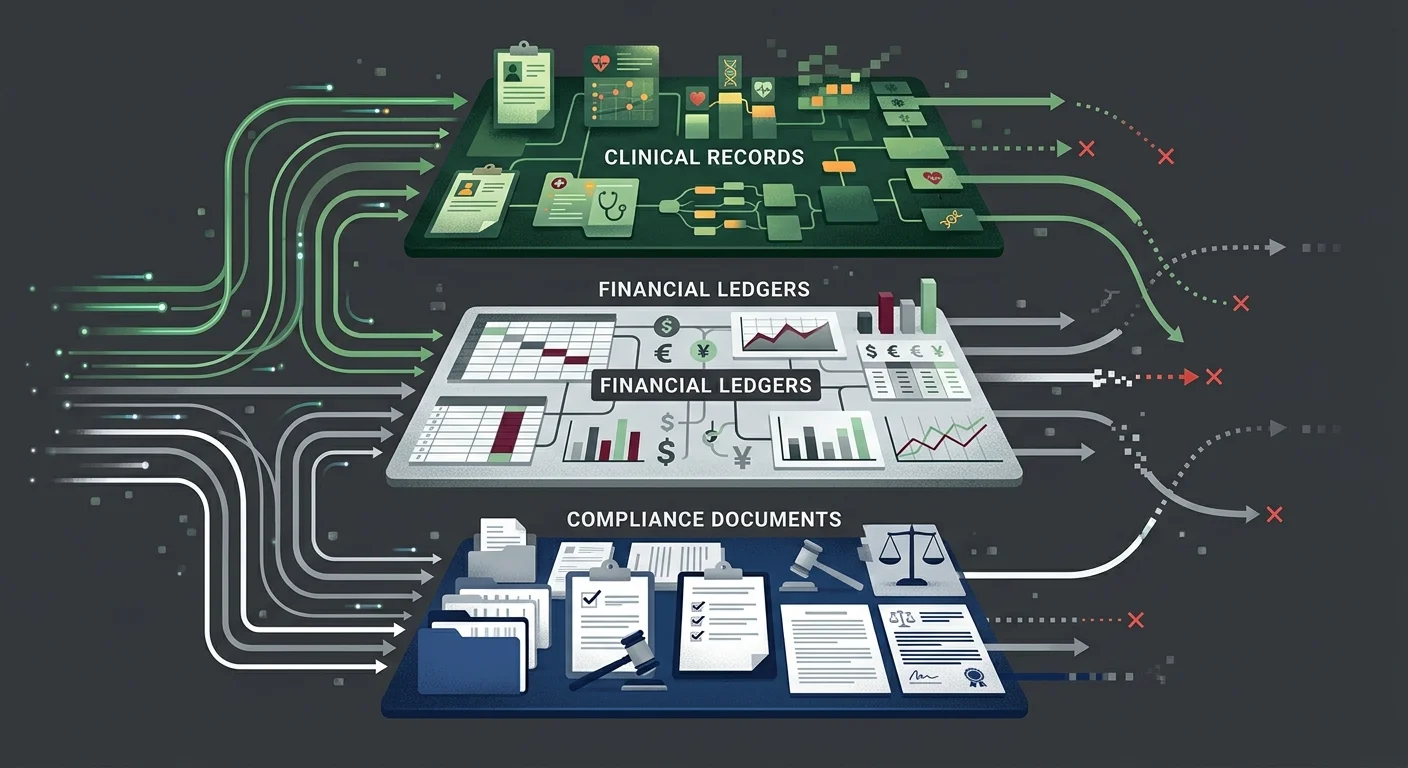
A chiropractic practice's data isn't one file. It's a layered set of clinical, financial, and administrative records — each with its own retention rules, its own audit risk, and its own failure mode during migration.
Most checklists verify that the data transferred. They don't verify that it transferred correctly, or that it can be retrieved in a format that satisfies an auditor or payer years from now.
The Three Data Categories Most Migrations Get Wrong
- Clinical Documentation (SOAP notes and AT modifier support) — This is the foundational layer. Every SOAP note, functional assessment, and clinical rationale supporting active versus maintenance care determinations has to move in full — not just migrate, but migrate intact and linked to the right encounters. For Medicare patients, this documentation isn't optional. It's what supports every AT modifier claim in your billing history. Per Medicare Compliance Tips from CMS, chiropractic services carry a 33.6% improper payment rate — largely driven by documentation failures. If that documentation doesn't survive your migration, you can't defend those claims. It doesn't matter that you had the notes before. If you can't produce them, you didn't have them.
- Billing History and Ledger Integrity (financial records) — This is where practices lose money they don't realize they've lost. Ledger flattening compresses patient financial history into net balances. Balances get zeroed. Unapplied credits vanish. Payment history gets reformatted in ways that make reconciliation impossible. Per MGMA Financial Management research, reconciling patient ledgers and recovering unapplied credits is the most critical step in preventing post-migration AR aging and compounding liability. You can't reconcile what you can't retrieve.
- Compliance Documentation (SRAs, BAAs, training records) — Most practices don't think about this category until they're in an audit. Your Security Risk Assessments, prior Business Associate Agreements, HIPAA training logs, and incident response records are all retention-governed documents. They need to migrate with the same care as your clinical records — and they need to remain accessible long after the migration is technically complete.
| Data Category | What's at Risk | Audit Consequence | Retention Obligation |
|---|---|---|---|
| Clinical Documentation (SOAP notes, AT modifier support) | Flattened or stripped during migration | Cannot defend Medicare claims; improper payment findings | 6 years federal minimum; state rules often longer |
| Patient Ledger History | Balances zeroed; credits lost; payment history compressed | AR aging gaps; unrecoverable revenue; reconciliation failure | Duration of active AR + state retention minimum |
| ERA/835 Claim Responses | Unlinked from encounters post-cutover | Missing payment documentation; billing history gaps | 6 years per HIPAA Security Rule |
| HIPAA Compliance Records | Left on legacy server without access plan | Cannot demonstrate compliance history; SRA documentation gaps | 6 years per HIPAA Privacy Rule |
| Security Risk Assessments | Outdated post-migration; prior SRAs inaccessible | Material change not documented; active non-compliance | 6 years; new SRA required after system change |
Why "Successful Transfer" Doesn't Mean "Intact Data"
Migration tools are built to move records. They're not built to evaluate whether those records are complete, correctly mapped, or useful to anyone trying to retrieve them years from now.
That's the gap forensic data mapping closes. It's not a confirmation that records transferred — it's a verification that the relationships between records transferred. Clinical notes linked to the right encounters. Payment records tied to the right claims. Documentation history navigable by specialty, not just searchable by patient name.
For practices that submit complex claims — Medicare patients, personal injury cases, high-volume multi-payer environments — this level of verification isn't a nice-to-have. It's the difference between having defensible records and having a lot of files.
Retention Rules, Storage Mandates, and the 2026 Updates That Changed the Math
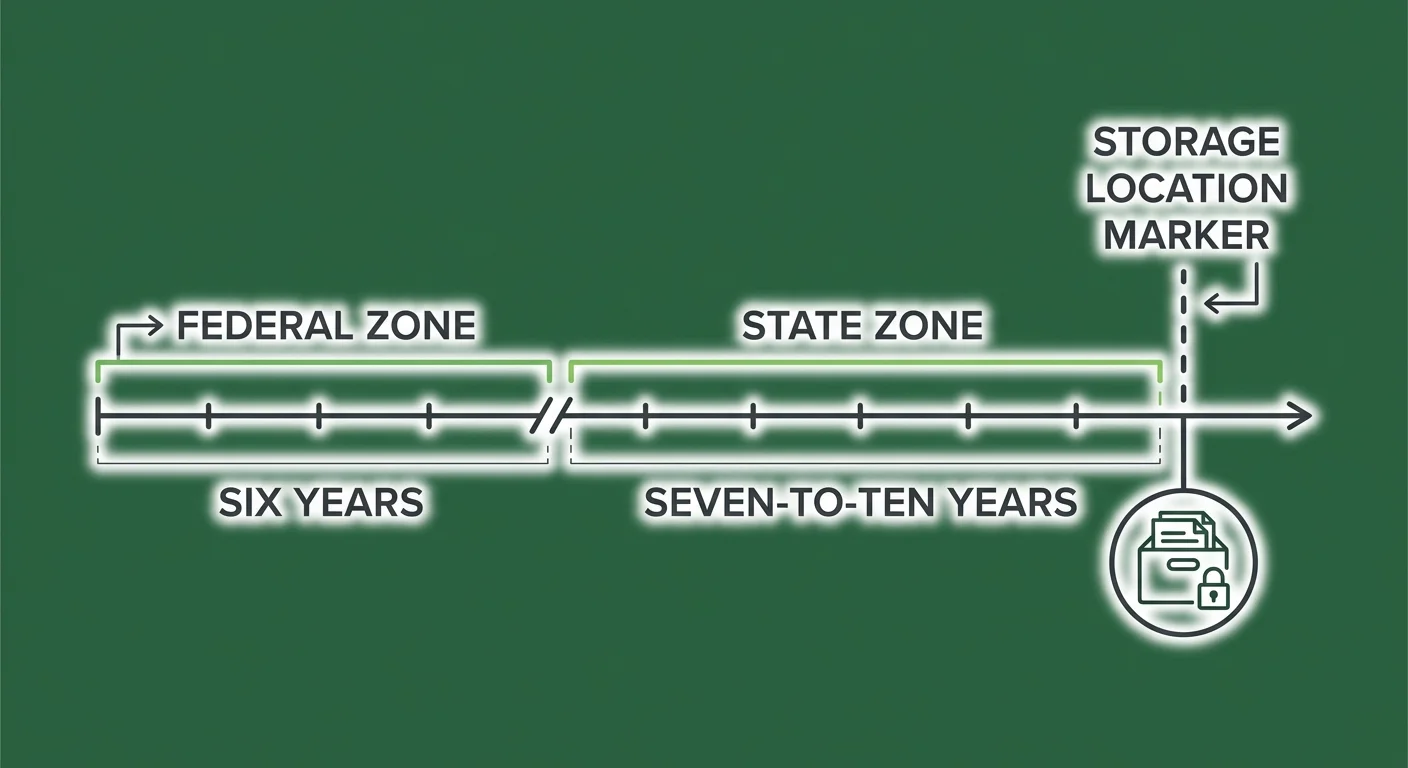
HIPAA sets a federal floor: six years from the date of creation or last effective date for compliance documentation. That's the minimum. Most states add their own retention requirements on top — typically seven to ten years for medical records, sometimes longer.
What's changed recently is where your records have to live.
Federal Retention: The Six-Year Minimum
The HIPAA Retention Requirements framework requires covered entities to retain protected health information and compliance documentation for six years. That covers your HIPAA policies, BAAs, Security Risk Assessments, and responses to any compliance event.
For chiropractic practices, "compliance documentation" goes deeper than most owners realize.
The notes supporting your active care determinations — the documentation justifying AT modifier use on Medicare claims — are clinical records that are simultaneously compliance records. A Medicare audit five years after your migration requires those records to be accessible, complete, and formatted in a way that reconstructs the clinical argument your billing was making at the time of submission.
Encryption protects data from unauthorized access. Forensic reconciliation ensures the data exists and is retrievable. You need both.
State Requirements: The Seven-to-Ten Year Overlay
HIPAA's six-year minimum is almost universally exceeded by state law. Most states require medical records retention of seven to ten years from the date of last service. Some states go longer for records involving minors or deceased patients.
The practical implication: your legacy server isn't a decommission target after migration. It's a retention asset.
The question isn't whether to keep your old records — it's whether you can actually access them for the full duration of your retention obligation. Practices that archive or shut down their legacy environment in the months after migration often discover, sometimes years later in an audit, that the records are technically present but practically inaccessible without a live software license or a vendor that no longer exists.
That's not a storage problem. That's an access problem — and it produces the same audit outcome as having no records at all.
The US-Based Storage Requirement
Several states have moved beyond retention guidance and now mandate that electronic health records be stored within the United States. Texas SB 1188 is one of the most consequential recent examples — requiring US-based storage for all electronic health records, with retroactive application to existing files.
For practices migrating to cloud-based EHRs, this means vendor due diligence includes geography.
Ask the question before you sign: "Where are your data centers?" If the answer isn't a US-based location — or if the answer is vague — get clarity before the migration, not after. A vendor storing data through offshore infrastructure may create compliance exposure that your BAA doesn't resolve.
The Security Risk Assessment Requirement Post-Migration
A system switch is a material change to your operating environment. HIPAA Security Rule requirements mandate a new, documented Security Risk Assessment after any material change.
This isn't a best practice recommendation. It's a specific compliance obligation.
Your prior SRA assessed the environment you were running. The post-migration SRA needs to assess the environment you're running now. There's no grace period — the requirement is triggered when the change occurs, not when the chaos from the migration settles.
| Requirement | Federal Floor | Common State Overlay | What Changes Post-Migration |
|---|---|---|---|
| HIPAA Privacy Rule — compliance docs | 6 years | 7–10 years medical records | Must remain accessible; legacy server can't simply be shut down |
| HIPAA Security Rule — SRA | Required at material change | Varies | New SRA required after EHR migration |
| US-Based Storage | Varies by state | Texas SB 1188 and similar | Cloud vendor location requires verification |
| Active care documentation | 6 years federal | State medical records rules | Must migrate with encounter linkage intact |
| BAA Documentation | 6 years | Same | Must cover new vendor relationship; prior BAAs must be retained |
What a Compliant Migration Actually Looks Like

A compliant EHR migration isn't a single event. It's a three-phase process: pre-migration preparation, active migration execution, and post-migration verification.
Most practices focus almost entirely on the middle phase and skip the other two.
The EHR Migration Risk Framework from Deloitte identifies financial reconciliation as the most frequent failure point in EHR implementations — specifically because of inadequate legacy data mapping. The technical migration completes. The financial mapping doesn't. The practice doesn't find out until months later.
Pre-Migration: The Data Inventory You're Not Running
Before a single record moves, a compliant migration requires a structured inventory of what you have — not a file count, a map.
- Clinical record linkage audit (documentation review) — Confirm that your SOAP notes are attached to the correct encounters, that your AT modifier documentation links to the right Medicare claims, and that your functional assessment history is navigable by patient and date of service. Whatever gaps exist before the migration will exist in the new system too.
- Open AR inventory (financial review) — Document every open claim, every unapplied credit, and every pending ERA before cutover. This is your reconciliation baseline. Without it, there's no way to verify that your post-migration financial position matches what you started with.
- Compliance document index (administrative review) — Catalog your existing SRAs, BAAs, incident response documentation, and HIPAA training records. Know where they are before migration so you can confirm they're accessible after.
- Legacy system access plan (infrastructure review) — Decide how you'll maintain read access to your legacy environment after cutover. This isn't about keeping the old system running — it's about keeping the records retrievable for the full duration of your retention obligation.
- Vendor storage verification (technical review) — Confirm the geographic location of your new vendor's data centers before you sign anything. Get it in writing.
Active Migration: The 180-Day Window That Matters Most
The period immediately following cutover is your highest-risk window.
Claims from your old system are still being adjudicated. ERA responses are arriving in a financial environment that has changed. Patients are making records requests against a system you're actively transitioning.
The 180 days after cutover require active oversight:
- All ERA responses from legacy claims should be manually matched to their originating encounters.
- Any patient balance that reads $0.00 post-migration should be flagged for reconciliation — not assumed to be correct.
- Your legacy system should remain in live read-only mode (not archived) so that records requests can be fulfilled without delay.
- Your new SRA process should be initiated — not deferred until the chaos settles.
Practices that have a billing software compatibility-experienced billing team engaged during this window catch unlinked claim responses and ledger errors while they're still correctable. Left unmonitored, those errors age into the AR and compound.
Post-Migration Verification: The Forensic Reconciliation
Confirming that data transferred is necessary but not sufficient.
A forensic reconciliation verifies completeness and integrity — not just presence.
- Record count verification — Compare patient, encounter, and claim counts between legacy and new system. Any discrepancy is a flag.
- Balance reconciliation — Run a total AR comparison. Identify every patient whose balance changed and reconcile each one.
- Clinical linkage spot check — Pull a sample of complex cases — Medicare patients, PI cases, active care transitions — and confirm that SOAP note history, billing history, and documentation support are intact and navigable.
- Compliance document accessibility test — Confirm that your SRAs, BAAs, and training records are accessible in their original format. If they're only accessible through a legacy system that requires a live license, solve that problem before the license lapses.
| Migration Phase | What to Verify | What Failure Looks Like | Recovery Window |
|---|---|---|---|
| Pre-Migration | Open AR baseline; compliance doc inventory; legacy access plan | No reconciliation baseline; inaccessible legacy records | Before cutover only |
| Active Migration (0–180 days) | ERA linkage; ledger balances; legacy read access; new SRA initiation | Unlinked claim responses; zeroed balances; decommissioned legacy | Months — before AR ages |
| Post-Migration Verification | Record counts; balance reconciliation; clinical linkage spot check | Discovered months/years later in audit; unrecoverable records | Depends on when discovered |
Who This Process Is — and Isn't — For
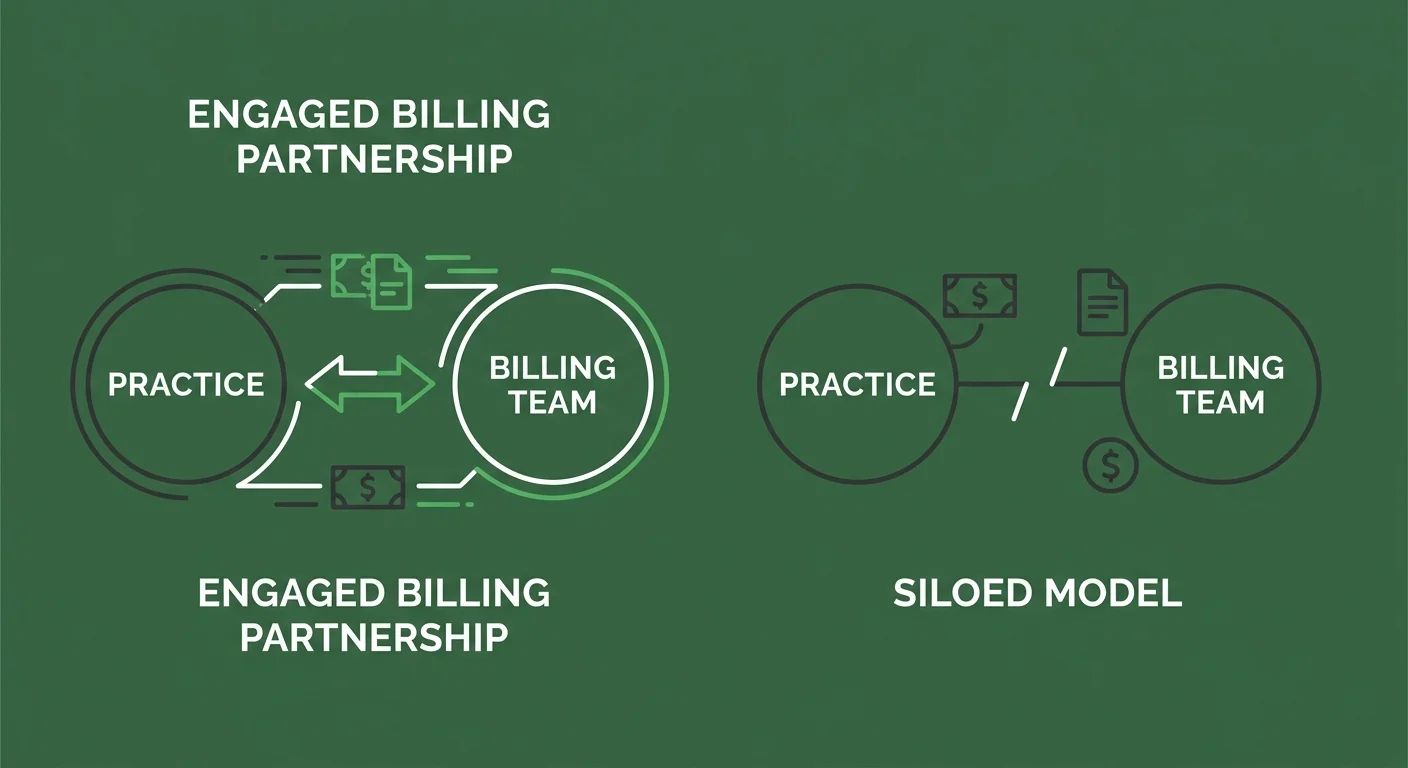
There's a version of this that works and a version that doesn't.
The version that doesn't work: treating your billing operation as a bystander to the migration. Hand off the IT work, assume billing will sort itself out, and circle back when the claims start getting denied.
This Is for Practices That Treat Billing as a Partnership
Submission is not billing. Getting paid is billing.
A compliant migration isn't a checklist your software vendor runs. It's a process your billing operation has to own — from pre-migration data inventory through post-migration forensic reconciliation. Your billing team needs to know your open AR baseline before cutover. They need to be monitoring ERA responses during the 180-day window. They need to run the financial reconciliation that confirms your ledger integrity held.
If you're working with a billing company that told you the migration is the vendor's responsibility — that's the communication silence this industry has normalized.
It's not professionalism. It's a structure that hides problems until they become cash flow crises. You should know what's happening with your claims before, during, and after a major system change. If you don't, something is already wrong.
The practices that get through EHR migrations without compliance exposure are the ones with billing partners who are in the room — not waiting to be called.
This Is Not for Practices Shopping on Price
A compliant migration review requires skilled clinical documentation review, financial history reconciliation, and compliance record verification. That work takes time and expertise.
It isn't compatible with a billing relationship selected because the rate was the lowest number on a comparison sheet.
If the first question in your billing evaluation is "what's your rate?" — this conversation isn't for you yet. The compliance exposure from a poorly executed EHR migration is categorically more expensive than any billing fee differential.
Practices ready to evaluate fit — including whether their billing partner has the documentation expertise to support a complex migration — are the practices this process is built for.
The articles below cover the specific failure modes and recovery paths for chiropractic EHR migrations in more detail:
- What Are the Most Common Data Transfer Errors in Chiropractic EHR Migrations?
- Why is the ChiroTouch Cloud Migration Causing Billing Interruptions in 2026?
Frequently Asked Questions
Does My EHR Vendor's BAA Cover All Migration-Related Data Loss?
No. A BAA governs how a vendor protects data while it's in their possession. It doesn't cover data integrity failures caused by the migration tool itself — things like ledger flattening, unlinked claim responses, or stripped documentation history. Those failures happen during the data transfer process, which the BAA typically excludes from its liability scope. The BAA is a necessary compliance document. It is not a migration guarantee.
How Long Must I Keep My Old Chiropractic Server After Migrating to the Cloud?
You must keep your legacy records accessible for the duration of your state's medical records retention requirement — typically seven to ten years from the date of last service, though this varies by state. The federal HIPAA minimum is six years for compliance documentation. The practical requirement is whichever of these periods is longer. "Accessible" means retrievable on demand — not just technically present on a server that requires a lapsed software license to read.
Is It a HIPAA Violation If My Patient Balances Imported as $0.00?
It's not automatically a privacy breach, but it is a documented data integrity failure. If those zeroed balances represent open claims — and they often do — the missing financial history creates a record-keeping gap that surfaces in a financial or clinical audit. The consequence isn't a fine for the import error. It's the inability to produce accurate billing history when a payer, a patient, or a Medicare auditor requests it. That's the audit exposure.
What Is the US-Based Storage Requirement for EHRs?
State-level requirements vary, but several states have now mandated that electronic health records be stored within the United States. Texas SB 1188 is one of the most recent and substantive examples — requiring US-based storage for all electronic health records with retroactive application to existing files. For practices migrating to cloud-based EHRs, this means verifying where your new vendor's data centers are physically located before signing. A vendor storing data through offshore infrastructure may create compliance exposure your BAA doesn't resolve.
Do I Need a New Security Risk Assessment (SRA) After My EHR Migration?
Yes. An EHR migration is a material change to your operating environment, and HIPAA Security Rule requirements mandate a new documented SRA after any material change. Your prior SRA assessed a technical environment that no longer exists. Your post-migration SRA needs to assess the one you're operating now. There's no grace period for this — the obligation begins when the material change occurs. For practices working through a post-migration recovery, initiating the SRA is one of the first steps.
What Is Ledger Flattening and Why Does It Happen?
Ledger flattening occurs when a migration tool compresses or summarizes patient financial history to accommodate the data structure of the new EHR system. Rather than migrating each transaction as a discrete record, the tool creates a net balance — which appears correct at the surface but loses the transaction-level history underneath. The result is a ledger that looks clean but can't be audited, reconciled, or used to reconstruct billing decisions if a payer dispute or audit requires it. It's one of the most common migration failures, and it's almost invisible until you need the detail that isn't there.
How Do I Verify That My AT Modifier Documentation Survived the Migration?
Pull a sample of Medicare patient records — specifically patients who were billed under active care status in the twelve months before your migration. Confirm that the SOAP notes supporting AT modifier use are present, dated correctly, and linked to the corresponding billing encounters in your new system. If the notes exist but aren't linked to the claims, or if the notes are present but don't support the clinical rationale, that's a documentation gap. A billing reviewer who works as a ChiroTouch Cloud Specialists partner can run this spot check systematically rather than manually. Also see How Do I Recover Lost Claims Data After a ChiroTouch Server-to-Cloud Switch? for recovery options if documentation gaps are found.
When Should I Start the Post-Migration Verification Process?
Immediately after cutover — not after the migration "settles." The 180 days following a migration cutover are your highest-risk window. Claims from your legacy system are still being adjudicated. ERA responses are arriving in a changed financial environment. Ledger errors caught in this window can be corrected. Ledger errors discovered a year later are harder to unwind and often unrecoverable. The verification process isn't something to schedule after the dust clears. It is part of the migration. See also How to Audit Your EHR Data Migration for Revenue Leakage? and What is the Real Cost of EHR Migration Downtime for a Chiropractic Practice? for a structured audit framework and full financial picture.
The Bottom Line on EHR Migration Compliance
A migration that's technically complete and a migration that's compliant aren't the same thing.
The gap between them is where practices lose money they can't trace, fail audits they can't defend, and discover — sometimes years later — that the records they were counting on don't exist in a form anyone can actually use. The encryption was fine. The BAA was signed. The data came over. And none of that prevented the failure.
The practices that get through this correctly treat the migration as a billing event, not an IT event. That means an open AR baseline before cutover. Active ERA monitoring during the 180-day window. A forensic reconciliation of ledger balances, clinical linkages, and compliance document accessibility. And a billing partner who is engaged through the entire process — not one who handed over a checklist and went quiet.
Submission is not billing. Getting paid is billing. And demonstrating to a Medicare auditor that your billing was accurate, documented, and defensible — that's the compliance outcome this whole process is working toward.
If your migration is approaching — or if you've recently completed one without a post-migration verification — the time to address this is before you're asked to.
Knowing your software migrated is one thing. Knowing your billing survived the migration is different.
A practice assessment reviews your full billing operation — not just claims volume — and shows you what's intact, what's at risk, and what needs to be addressed before it becomes an audit finding.
Book a Call to see exactly how your migration stacks up.
Software migration is the floor. Documentation integrity is the ceiling.

© 2026 Bushido Billing. All Rights Reserved | Web Design by iTech Valet