

How to Re-Establish Your Billing Workflow After an EHR Platform Switch?
Re-establishing your billing workflow after an EHR platform switch requires moving beyond basic data entry to forensic reconciliation across three independent systems: your legacy server’s accounts receivable, the new platform’s imported ledger, and the clearinghouse’s submission logs. The most critical failure point is what billing specialists call the “authentication gap” – claims marked as “Sent” in the new EHR that never reached a payer because Trading Partner IDs and API tokens were not properly re-authenticated during the migration window.
This isn’t a software training problem. It’s a revenue continuity problem.
The switch goes live. The vendor closes the ticket. Your team moves forward. But underneath that surface-level calm, claims are sitting in a local queue that has no authorized connection to the clearinghouse. ERAs arrive with no charge to match. Pre-migration balances sit in a ledger the new system can’t see. Active care packages disappear from the billing logic entirely.
The 2-to-4 weeks after a platform switch – often called the “Post-Live Silence” – feel quiet. The claims screen shows activity. But the bank account tells a different story. Most practices don’t catch the gap until the 60-day aging report surfaces numbers that don’t make sense. By then, some of that revenue is gone.
Recovery requires three parallel workstreams running simultaneously: a legacy AR reconciliation to preserve pre-migration claim history as a reference point, a new-platform ledger audit to identify what billing logic didn’t survive the transfer, and a clearinghouse re-authentication to confirm the new EHR is actually authorized to submit claims on your behalf. All three must happen in the first 30 days – not the first 90.
This guide covers each workstream in detail: the specific steps for clearinghouse EDI re-authorization, the billing logic categories most likely to break silently after a migration, and how to structure legacy server access during the transition window.
Why EHR Migrations Break Billing – and Why Software Vendors Don’t Fix It
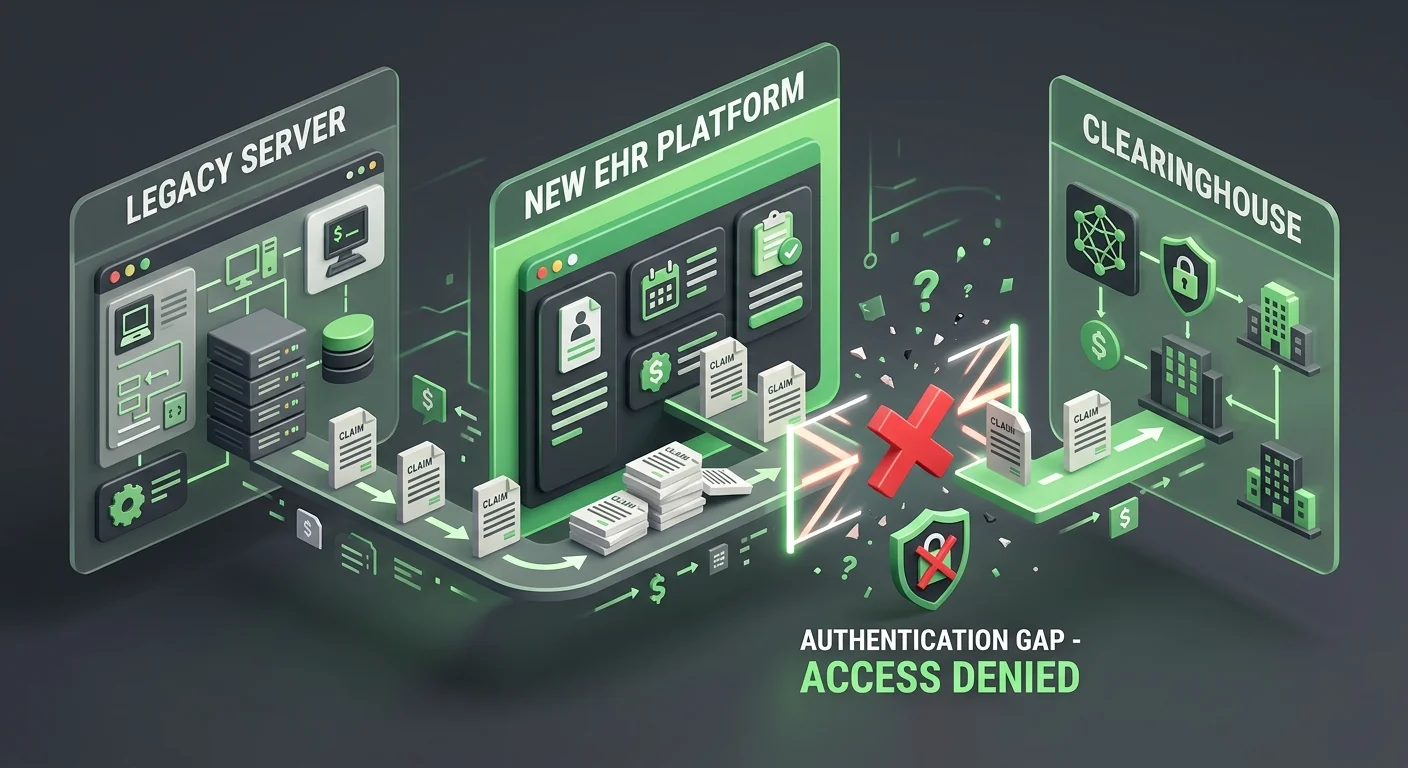
Most EHR migrations are evaluated by two metrics: Was the data transferred? Is the new system live? Both can be true simultaneously while your billing is quietly stalling.
The vendor’s job ends at data transfer. Your billing’s job is to produce cash flow. These are not the same job. Understanding that distinction – and having a full-service chiropractic billing partner who operates on the billing side of that line – is what separates practices that recover smoothly from the ones that surface a cash flow crisis 90 days later.
The “Submission Is Not Billing” Problem
Here’s the distinction the billing industry consistently avoids making clear: submission is not billing. Getting paid is billing.
An EHR can submit a claim. It can log it as “Pending.” It can confirm the file was packaged and handed off to the clearinghouse queue. None of that tells you whether a payer received it, whether the clearinghouse accepted it, or whether money is actually on its way.
Research on EHR transitions published in peer-reviewed literature confirms what billing specialists see regularly: data loss and mapping errors are significant, under-acknowledged risks during EHR transitions – and financial continuity is among the hardest things to preserve. The technical system transfers. The revenue engine doesn’t.
The new system looks like it’s working because the screens populate and the queues show activity.
But the claims aren’t moving.
Why the Vendor’s “Migration Complete” Status Means Nothing for Billing
EHR vendors are incentivized to declare migrations complete. Their support contract closes. Their onboarding team moves to the next client. The “100% complete” status they issue means the data is in the new system – not that your clearinghouse connection is authorized, not that ERAs will post, not that your billing logic survived the transfer.
McKinsey’s revenue cycle research identifies this directly: fragmented vendor landscapes and technology handoff failures consistently drive costs, delays, and revenue errors during transitions. The vendor closes the ticket. The cash flow gap opens.
A practice waiting for the software company to fix its billing is waiting for something that isn’t coming.
The right question after go-live isn’t “when will the software be ready?” It’s “what has to happen on the billing side – independently of the software – for revenue to resume?”
The Three-System Reconciliation Framework
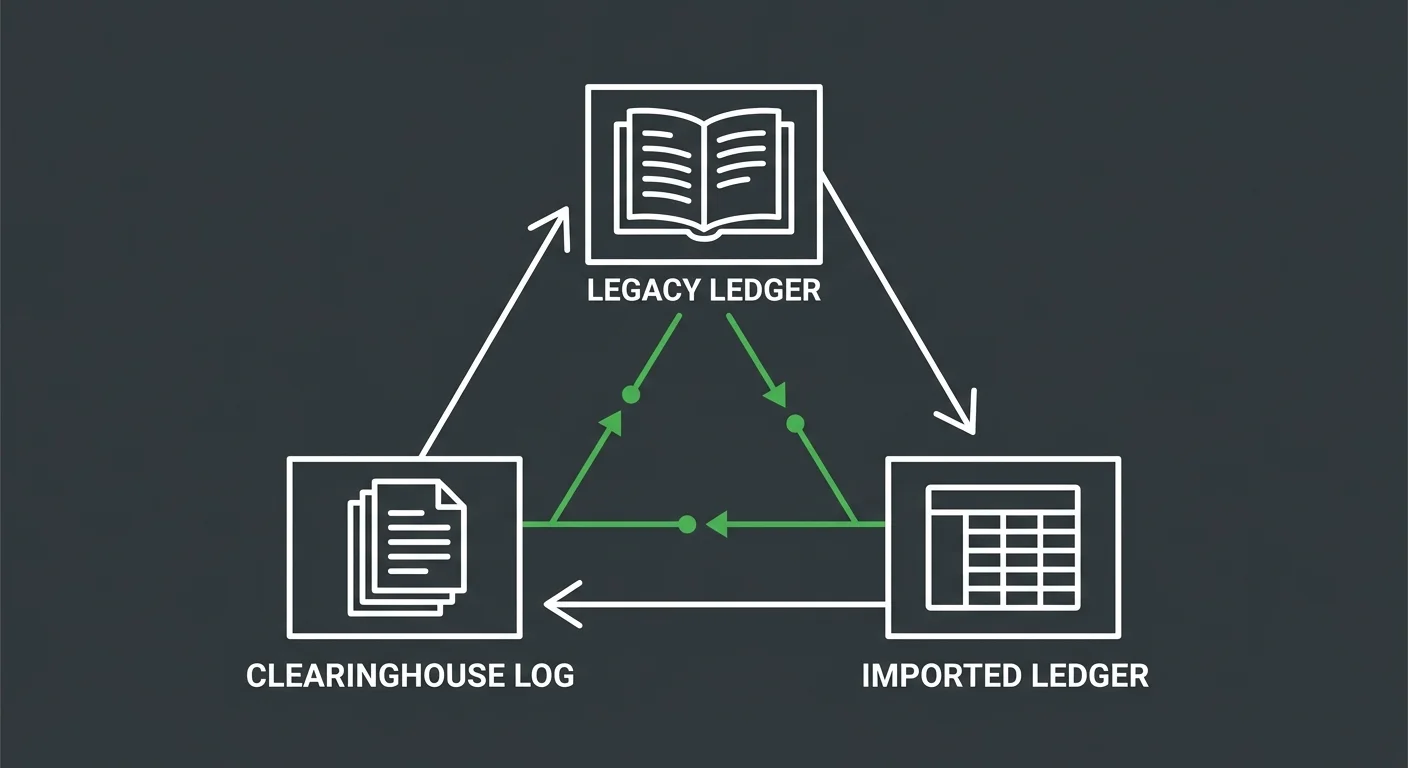
Restoring billing after a migration isn’t a single audit. It’s a reconciliation across three independent systems that don’t talk to each other automatically when the switch happens. Miss one, and the gaps compound.
Deloitte’s EHR migration risk framework identifies financial reconciliation as the most frequent point of failure in EHR implementations – specifically because practices treat it as part of the software setup instead of a separate operational discipline.
It isn’t. And treating it that way is expensive.
System 1: Legacy Server AR – The Read-Only Source of Truth
Your legacy server should not be deactivated within 180 days of going live on a new EHR.
That’s not a data storage preference. It’s a billing recovery requirement.
The legacy AR ledger contains:
- Pre-migration balances that may not have transferred correctly
- Claim history needed to match incoming ERAs against original charges
- Patient account records required for balance dispute resolution
- Pre-authorization and care plan data that did not migrate with the chart
Keep it accessible in read-only mode for at minimum six months post-go-live. Assign one person – not the whole team – as the point of contact for legacy reconciliation requests. Every time a patient disputes a balance or an ERA arrives without a matching charge, that ledger is your reference point.
The practices that deactivate the old system in week three are the ones calling their EHR vendor six months later asking if there’s any way to recover deleted data. If your migration involved a ChiroTouch server-to-cloud switch, the legacy server preservation window is especially critical – server-based claim history doesn’t follow automatically to a cloud database.
System 2: New Platform Imported Ledger – What Actually Came Through
Data migration tools move records. They don’t verify billing logic.
Active care packages, provider macro links, and visit-based billing rules are among the most consistent casualties of an EHR migration. They exist in the legacy system as configured settings. In the new system, those settings have to be rebuilt manually – and they won’t announce themselves as missing. They’ll simply produce wrong codes or no codes at all, quietly, visit after visit.
Run a structured ledger audit within the first two weeks of go-live:
- Balance carry-over verification – Compare total open AR in the legacy system against what appears in the new system’s imported ledger. Discrepancies indicate records that didn’t migrate correctly.
- Patient account sampling – Pull 20-30 accounts at random. Compare visit history, outstanding balances, and applied payments across both systems.
- Active care package audit – Identify every patient on a prepaid or visit-based plan. Verify the plan logic was rebuilt in the new system, not just the dollar balance.
- Provider billing logic check – Confirm that provider-specific coding rules, modifier defaults, and fee schedule assignments transferred correctly.
MGMA’s guidance on post-migration AR reconciliation is unambiguous: reconciling patient ledgers and unapplied credits is the most critical step in preventing post-migration AR aging. It belongs in week one – not week six when the aging report forces the conversation.
System 3: Clearinghouse Submission Logs – Where Claims Actually Go
This is the system most practices forget exists as a separate layer.
The EHR generates a claim and marks it sent. But “sent” in the EHR means the claim was packaged and passed to the clearinghouse connection – not that the clearinghouse accepted it, scrubbed it, forwarded it to the payer, or is expecting a response.
After a migration, the clearinghouse connection itself must be re-authenticated. This involves:
- Trading Partner ID verification – Confirm the new EHR is registered with each payer’s Trading Partner ID. A changed platform often means a new submitter profile is required at the payer level.
- EDI pathway re-authorization – The clearinghouse must authorize the new EHR as a registered submitter. If this step was missed during migration, claims package locally but fail at transmission.
- OAuth 2.0 token validation – API-connected EHRs use token-based authentication. Tokens issued to the old platform don’t carry over. New tokens must be generated and registered in the new system’s clearinghouse settings.
Log into the clearinghouse portal directly – not through the EHR – within the first 48 hours of go-live. Check for rejected batches, unauthorized submitter errors, or files flagged as unprocessable. These failures are often invisible inside the EHR because the error lives at the clearinghouse layer, not the platform layer.
| Clearinghouse Failure Type | What the EHR Shows | What’s Actually Happening |
|---|---|---|
| Unauthorized submitter | “Sent” or “Pending Submission” | Clearinghouse rejected the sender – no EDI pathway authorized |
| Trading Partner mismatch | “In Process” | Claim reached clearinghouse but failed payer routing – wrong submitter profile |
| Expired API token | “Queued” | Claims packaged locally, token expired, batch never transmitted |
| Orphaned ERA | Payment posted in bank | ERA arrived at clearinghouse but found no matching charge in new EHR |
Re-Authentication: The Step That Vendors Skip
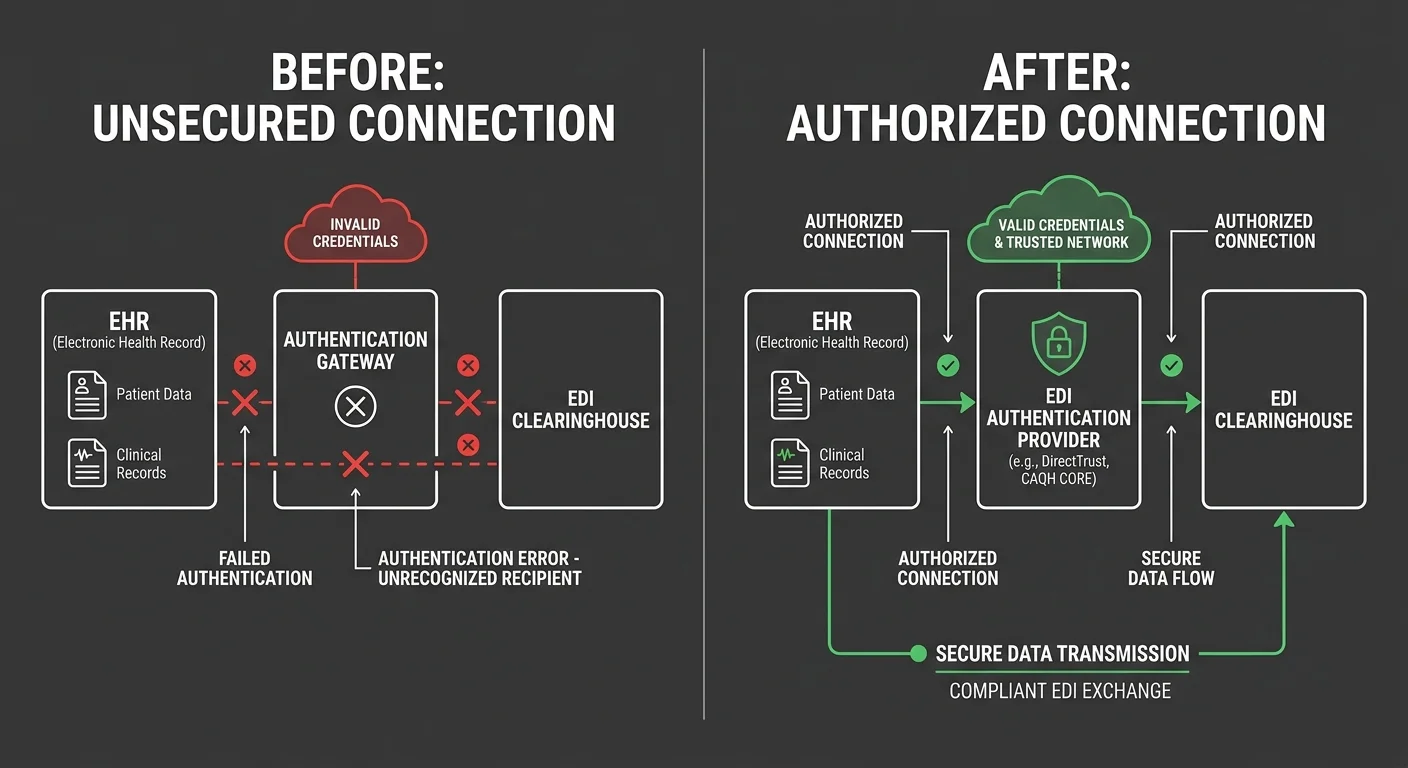
The authentication gap is the most consistent billing failure in EHR migrations – and the one least likely to appear on any vendor’s checklist.
When the EHR switches, the connection between your practice and the clearinghouse doesn’t automatically re-establish. The relationship between your practice EIN, your clearinghouse account, and each payer’s accepted submitter profile has to be rebuilt manually. That’s not a software update. It’s a credentialing action at the clearinghouse level – and it’s entirely separate from anything the EHR vendor manages.
EDI Re-Authorization: What It Is and Why It Matters
EDI (Electronic Data Interchange) is the transmission protocol connecting your EHR to your clearinghouse and your clearinghouse to each payer. When the EHR changes, the authorized submitter identity changes – even if the practice NPI and EIN stay the same.
Steps required to re-authorize the EDI pathway:
- Contact your clearinghouse’s provider relations team – not tech support – and inform them of the platform change
- Request a new submitter enrollment under the new EHR’s software ID
- Resubmit Trading Partner IDs for each active payer in your panel
- Confirm the new system’s NPI and EIN combinations are mapped correctly to each payer submitter profile
- Test with a small batch of non-urgent claims before releasing the full queue
This process takes 3-10 business days with most clearinghouses. Any claim submitted before re-authorization is complete will fail at the clearinghouse level – and that failure may never surface in the EHR’s claim status screen.
That’s the part that gets practices in trouble. The EHR shows “Sent.” The clearinghouse shows nothing – because it never received anything it was authorized to accept.
Medicare EDI and ChiroTouch Cloud Migrations
For practices migrating to ChiroTouch Cloud specifically, the EDI re-authorization is more involved than a standard migration because the submission architecture changed – not just the interface.
You don’t need to re-credential your provider status with Medicare. NPI, PTAN, billing privileges – all intact. What changes is the EDI submission pathway – the registered submitter profile that tells Medicare’s clearinghouse that this specific EHR is authorized to submit on your behalf.
If you’re working with a dedicated billing partner, they should be managing clearinghouse re-authorization independently of what the EHR vendor reports. The vendor handles the platform. The billing partner handles the revenue.
For clinics navigating ChiroTouch Cloud billing interruptions or reconciling claims after a server-to-cloud switch, clearinghouse re-authorization is the first thing to verify – before any other diagnostic. If the EDI pathway isn’t authorized, nothing downstream matters.
The Billing Logic That Doesn’t Survive a Migration
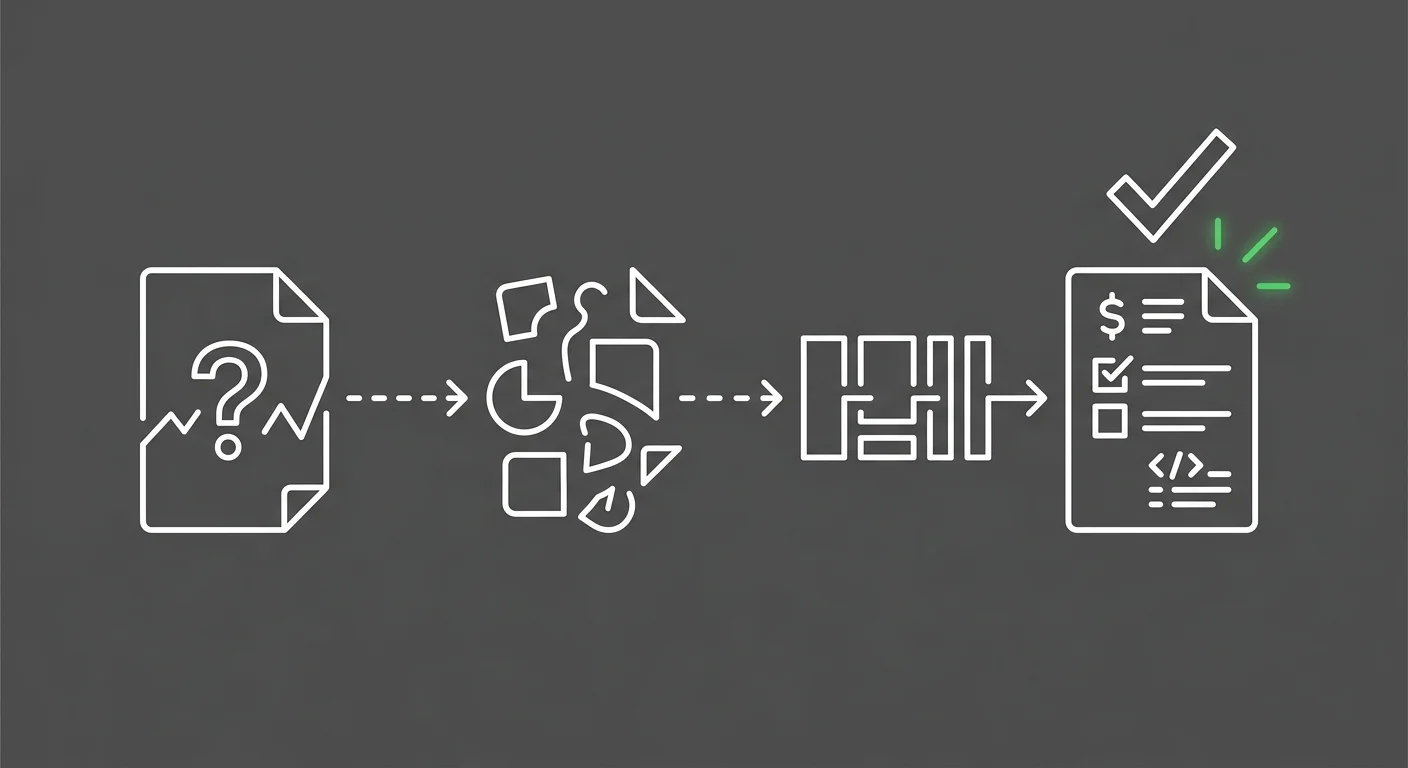
Data migrates. Logic doesn’t.
EHR migrations transfer records – patient demographics, visit history, outstanding balances. What they don’t reliably transfer is the operational logic your billing team built inside the old system over years of use.
That logic is where the revenue lives.
Care Packages and Provider Macros: The Invisible Failures
Two categories of billing configuration fail more consistently than any other:
Active care packages – Prepaid or visit-count plans where the patient purchased a bundle of services. In the legacy system, this was a configured billing rule tied to each visit type. In the new system, the patient’s balance may carry over – but the visit-level billing logic is gone. Every visit from that patient will now require a manual decision. And without a clear signal that the logic is missing, your team defaults to the wrong code, repeatedly.
Provider macro links – Coding shortcuts individual providers set up to match their documentation patterns. Entirely system-specific. Won’t transfer. Providers who were billing correctly through these shortcuts will now code inconsistently or under-bill on every visit type where the macro used to fire.
Audit both categories in the first week. Build a list of every active care package patient and every provider who used macros in the legacy system. Rebuild the logic before those patients check in for their next visit. If your team is simultaneously learning a new platform while handling this rebuild, ChiroTouch Cloud billing features training covers the platform-specific configuration that gets these rules back in place without depending on generic vendor onboarding.
The Unapplied Credit Problem
After a migration, unapplied credits are one of the most overlooked AR risks – and one of the quietest.
Payments received in the legacy system and applied correctly there may appear in the new system as credits with no matching charge – because the charge they applied to exists in the legacy ledger, not the new one. Left unresolved, those credits sit indefinitely or get misapplied to future visits, producing incorrect patient balances that take months to untangle.
Pull a full unapplied credit report within 30 days of go-live. Compare every open credit against the legacy system’s application record. Where the credit has a clear home in the legacy ledger, apply it manually in the new system and document the reconciliation. Don’t leave it for month-end.
| Migration Failure Category | What It Looks Like in the New System | Resolution Step |
|---|---|---|
| Active care packages | Patient visits billing at full rate, no plan discount applied | Rebuild plan logic manually; audit all active plan patients |
| Provider macros | Inconsistent coding across visits; under-billing on procedure codes | Rebuild macro equivalents; spot-check 2 weeks of visit claims |
| Unapplied credits | Credit balance on patient account with no linked charge | Match against legacy AR; manually apply or reclassify |
| Orphaned ERAs | ERA received; no auto-post; manual ERA queue growing | Match ERA to legacy charge ID; post manually with correct adjustment |
| Imported balance errors | Patient balance in new system doesn’t match legacy | Rerun migration report; manually correct discrepant accounts |
Who This Is Not For
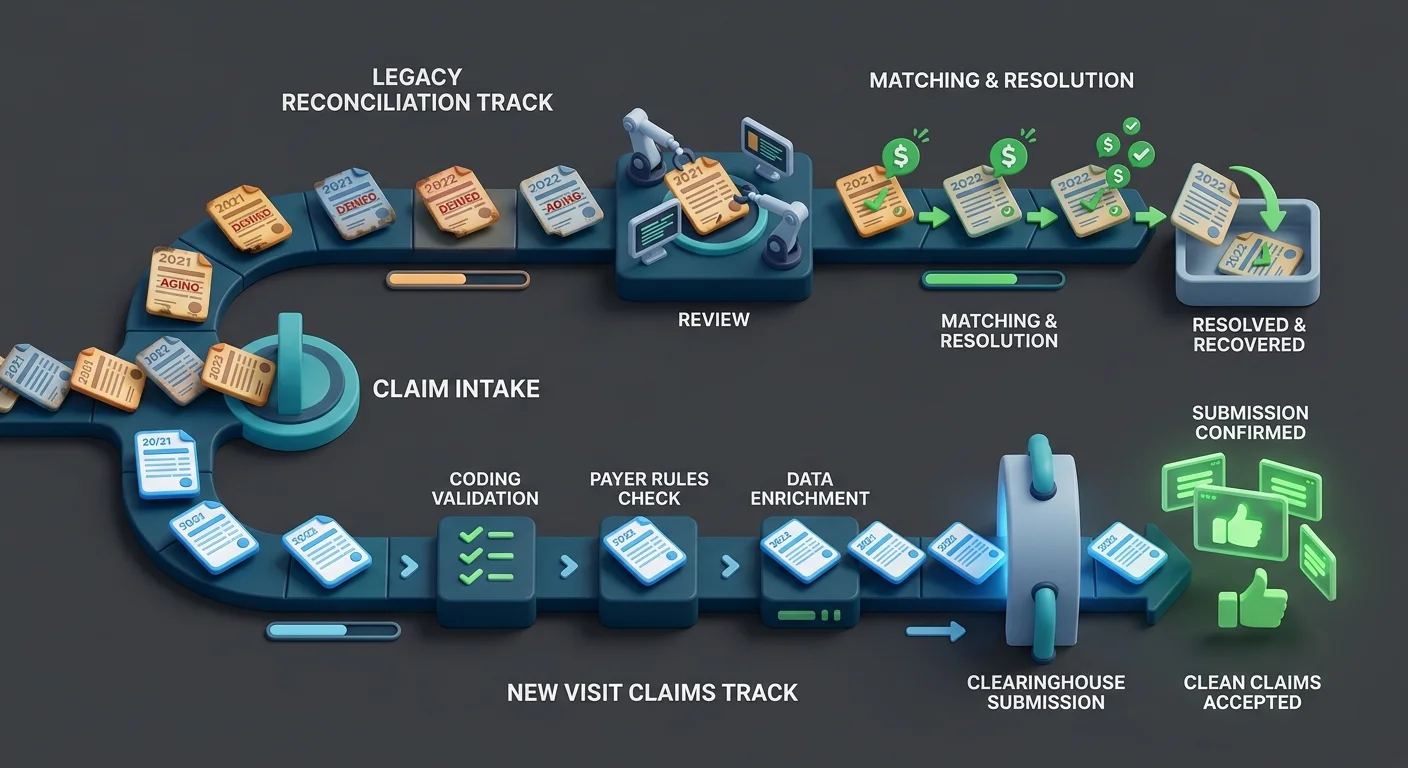
This reconciliation framework is built for practices that want to understand what actually happened to their billing after a migration – and fix it structurally.
Not every practice is ready for that.
If You Want the Software Vendor to Handle It
If the expectation is that the EHR platform handles both the migration and the billing recovery, this framework won’t serve you. EHR vendors are software companies. Moving data and getting the platform running is their scope. The revenue cycle work that happens after go-live – reconciliation, re-authentication, logic rebuilding – is not.
Practices that treat a migration as a software event rather than a billing event typically find the gap 60-90 days later when the aging report becomes impossible to explain. The ChiroTouch Cloud migration billing interruptions that practices experience are almost never caused by the software failing – they’re caused by the billing layer being left unmanaged while the software team declared the project done.
If you’re looking for a billing partner who’ll manage things quietly in the background while you focus on patient care – that model exists, but it requires a partner actively working the post-migration billing stack, not one who went quiet after the software went live.
If You Want a Quick Fix
Post-migration billing recovery isn’t a quick fix. It’s a structured process that takes 30-90 days depending on the volume of affected claims and complexity of the legacy data.
Practices that clear the immediate backlog without committing to the structural rebuild – care package logic, provider macros, clearinghouse re-authorization, ongoing ERA reconciliation – will repeat this cycle within six months.
The goal isn’t to get AR moving again. It’s to understand why it stopped – and to build a billing structure that doesn’t require emergency intervention after the next software decision your practice makes.
Frequently Asked Questions
Why do my claims say “Pending Submission” for weeks after the EHR switch?
This is almost always an authentication failure. The new platform’s API tokens or EDI submitter profile was not approved by the clearinghouse during the migration window. Claims are being packaged inside the EHR and queued locally – but the clearinghouse has no authorized connection to receive them. The fix requires contacting your clearinghouse’s provider relations team directly to complete submitter enrollment for the new platform. Until that step is done, the EHR’s submission queue is a staging area, not a transmission log.
Your billing software compatibility review should include a specific check on clearinghouse submitter status within 48 hours of go-live – before the full claim queue is released.
How do I find ERAs that didn’t post after the migration?
Log into your clearinghouse portal directly and navigate to the “Unlinked Claim Responses” or “Orphaned ERA” queue. Payments often arrive from payers on schedule, but the ERA can’t auto-post in the new EHR because the charge IDs it references don’t exist in the new database – they exist in the legacy ledger. These need to be matched manually. Pull the ERA’s claim detail, locate the original charge in the legacy system, and post the payment with a manual adjustment note. This queue should be reviewed daily for the first 60 days post-migration.
For practices coming off a ChiroTouch server migration, consulting a team that specializes in recovering claims data after a ChiroTouch server-to-cloud switch is worth the investment before the orphaned ERA queue compounds.
Is it safe to deactivate my old EHR server immediately after going live?
No. The legacy server should remain accessible as a read-only reference for at least 180 days post-go-live. This isn’t about nostalgia for the old system – it’s about having a verifiable source of truth for patient balance disputes, pre-migration claim retractions, and ERA reconciliation. If a patient calls about a charge from three months before the migration, that record exists in the legacy system. If an ERA arrives for a claim submitted under the old platform, the matching charge ID lives in the legacy ledger. Deactivating the server before that window closes risks creating permanent gaps in your AR history.
What is the most common billing logic that fails to migrate?
Active care packages and provider macro links fail more consistently than any other billing configuration. Care packages fail because the visit-level billing rule doesn’t transfer – only the dollar balance does. Provider macros fail because they’re entirely system-specific and have no equivalent in the migration export. Both require manual rebuilding in the new system before affected patients check in. Running a targeted audit for EHR data migration revenue leakage immediately after go-live will identify which configurations need to be rebuilt and in what priority order.
Do I need to re-credential with Medicare after switching EHRs?
You do not need to re-credential your provider status. Your NPI, PTAN, and billing privileges remain intact when you switch EHR platforms. What you do need to re-authorize is your EDI submission pathway – the registered submitter profile at the clearinghouse that identifies the new EHR as an authorized sender on your behalf. This is a different step from credentialing, and it’s one that EHR migration checklists frequently omit. Contact your clearinghouse’s provider relations team – not Medicare directly – to complete the submitter profile update for the new platform.
What are the most common data transfer errors in chiropractic EHR migrations?
The most common errors fall into four categories: unapplied credits that arrive without matching charges, care package balances that transfer without plan logic, patient balances that carry over with rounding or currency discrepancies, and visit history that imports without linked provider or facility information. Common data transfer errors in chiropractic EHR migrations are well-documented – the issue isn’t that they’re rare, it’s that most migration checklists treat them as edge cases rather than standard risks.
How do I train my team to manage billing in the new EHR while this reconciliation is happening?
Separate the two tracks. Reconciliation – matching legacy AR, posting orphaned ERAs, auditing care packages – should be handled by one dedicated person, not distributed across the whole billing team. Forward billing – new visit claims submitted in the new EHR – should run on its own track with a clear go-live date. Mixing the two creates confusion about which claims are legacy issues and which are new errors. For teams navigating the training side of this simultaneously, ChiroTouch Cloud billing features training addresses the platform-specific setup that your team needs to run forward billing confidently while the reconciliation work runs in parallel.
How long does it take to fully re-establish billing workflow after an EHR switch?
For most chiropractic practices, full billing recovery takes 30-90 days from go-live. The first two weeks are the highest-risk window – authentication failures, orphaned ERAs, and missing billing logic compound quickly if left unaddressed. Practices that start reconciliation on day one and involve an experienced billing partner recover faster and with fewer permanent AR losses. Practices that wait until the aging report signals a problem typically face a 60-90 day recovery window with a portion of pre-migration AR that is no longer recoverable.
What Recovery Actually Looks Like
The practices that get through a migration without a cash flow crisis share one thing: they didn’t treat go-live as the finish line.
They started reconciliation before the switch. They had someone log into the clearinghouse portal on day one – not the EHR, the clearinghouse. They kept the legacy server up. They audited care package logic before those patients walked back through the door. They knew the difference between a claim marked “Sent” and a claim actually moving through the payer system.
The revenue engine doesn’t migrate. Rebuilding it is deliberate.
None of what this guide covers – the clearinghouse re-authorization, the three-system reconciliation, the care package audit, the orphaned ERA queue – appears on the EHR vendor’s migration checklist. That’s not an oversight. It’s simply not their job.
It’s yours. Or it belongs to a billing partner who treats the post-migration window as the beginning of the real work, not a quiet period where things sort themselves out.
The “Post-Live Silence” is a warning sign, not a reward. When claims are actually moving, your billing shouldn’t feel quiet – it should feel visible.
Switching EHR platforms is a system event. Restoring your cash flow is a billing event – and it doesn’t happen automatically.
A practice assessment looks at your current billing operation end to end: clearinghouse authorization status, AR aging by claim age, ERA posting gaps, and billing logic integrity. It shows you exactly what survived the migration, what didn’t, and what the gap is costing you.
Book a Call to see where your post-migration billing actually stands.
Practices that understand what broke recover faster. Practices that assume the vendor handled it typically figure out otherwise 90 days later – when the AR report becomes impossible to explain.

© . All Rights Reserved | Web Design by iTech Valet