

How to Optimize ChiroTouch for Faster Claim Processing in 2026
Optimizing ChiroTouch for faster claim processing in 2026 comes down to three things: activating the automation that’s already built into the platform, making sure your clearinghouse integration is configured correctly, and using Rheo AI’s compliance tools to catch documentation issues before they turn into denials.
ChiroTouch has a lot of capability built in. Between Rheo AI, integrated clearinghouses, automated scrubbing, and real-time eligibility verification, the tools for fast, clean billing are already there. The challenge is that most practices set up their workflow during onboarding and haven’t revisited it since, even as the software and payer requirements have changed around them.
That’s understandable. You’re running a clinic, seeing patients, and managing a team. Billing configuration usually isn’t the thing that gets your attention until something goes wrong.
This guide walks through the specific settings, integrations, and workflows that help ChiroTouch practices move from delayed claim cycles to consistent, same-day submissions. Whether you’re on ChiroTouch Cloud or still running the server-based version, there are practical steps you can take to get claims out the door faster and keep your revenue cycle moving.
And if your billing workflow feels more reactive than proactive – more focused on identifying revenue leakage after the fact than preventing it – that’s a clear sign the configuration deserves a closer look.
The goal here is straightforward: securing predictable clinic cash flow so billing stops being a source of stress and starts working quietly in the background, the way it should.
Why Your ChiroTouch Workflow Might Need a Tune-Up
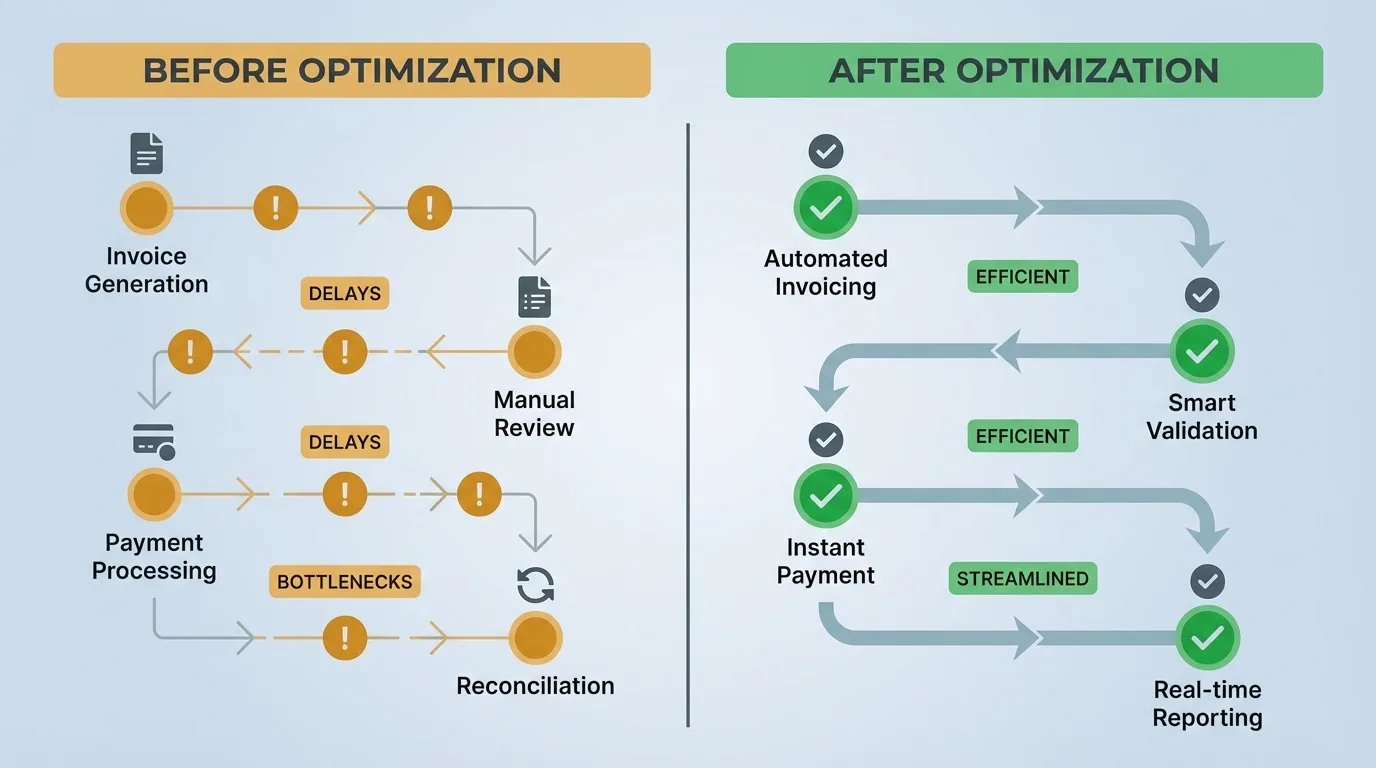
ChiroTouch has changed quite a bit over the past two years. Between the launch of Rheo AI, expanded clearinghouse integrations, and the ongoing cloud migration, the platform has a lot more to offer than it did even in 2024.
Most practices just haven’t had the chance to update their workflows to match.
The Configuration Gap
Here’s how it usually goes. A clinic sets up ChiroTouch during onboarding. Macros get built, clearinghouse credentials get entered, and the basic billing workflow starts running. Then time passes. Payer requirements shift. New modifiers get introduced. Software updates add features that never get turned on.
Nobody did anything wrong. It’s just that the original setup was designed for a specific moment, and the billing landscape kept moving.
Common examples we see:
- Outdated macros – Payer requirements shift over time, and macros built two years ago may be missing modifiers that certain payers now require. These don’t cause obvious errors, they just cause preventable denials.
- ERA auto-posting left unconfigured – CT ProClear may be activated, but if ERA auto-posting was never turned on, someone on the team is still manually entering payment data from paper EOBs.
- Stale payer registrations – When a payer changes its ID or billing requirements, those updates need to be reflected in the trading partner configuration. If they’re not, claims can fail to transmit without a clear error message.
These aren’t dramatic failures. They’re small gaps that add up quietly over time – a few extra days here, a preventable denial there – until the cumulative effect shows up in your AR aging report.
Server vs. Cloud: What to Know
There’s a real difference between ChiroTouch Cloud and the legacy server-based version when it comes to billing speed.
Cloud users get direct API connections to clearinghouses, automatic software updates, and access to Rheo AI. Server users rely on SFTP file transfers for claim submissions, manual update installations, and don’t have access to the AI-powered tools that are now part of the cloud experience.
That doesn’t mean server-based practices can’t make meaningful improvements. They absolutely can, and we’ll cover those here too. But the cloud version does have a higher ceiling for speed and automation, and ChiroTouch is putting most of its development resources there going forward.
If you’re still on the server version and billing insurance regularly, it’s worth having a conversation about what migration would look like for your practice. Not as an emergency, but as a strategic step toward a smoother workflow long-term.
The Cost of Manual Steps
Every manual step in a billing workflow introduces the possibility of delay. And in a busy practice, delays compound.
According to Experian Health’s 2025 State of Claims survey, 54 percent of healthcare providers report that claim errors are increasing. And 68 percent say submitting clean claims is harder than it was a year ago.
Industry estimates put the cost to rework a single denied claim between $25 and $181. For a chiropractic practice processing hundreds of claims each month, even a modest denial rate adds up to real dollars in administrative costs alone.
And then there’s the time. Every hour your office manager spends chasing a denied claim is an hour they’re not spending on patient scheduling, follow-ups, or reading an AR aging report to catch issues early.
The good news is that most of these delays are fixable with configuration changes you can make inside ChiroTouch itself. That’s what the rest of this guide covers.
How Rheo AI Supports the Billing Workflow
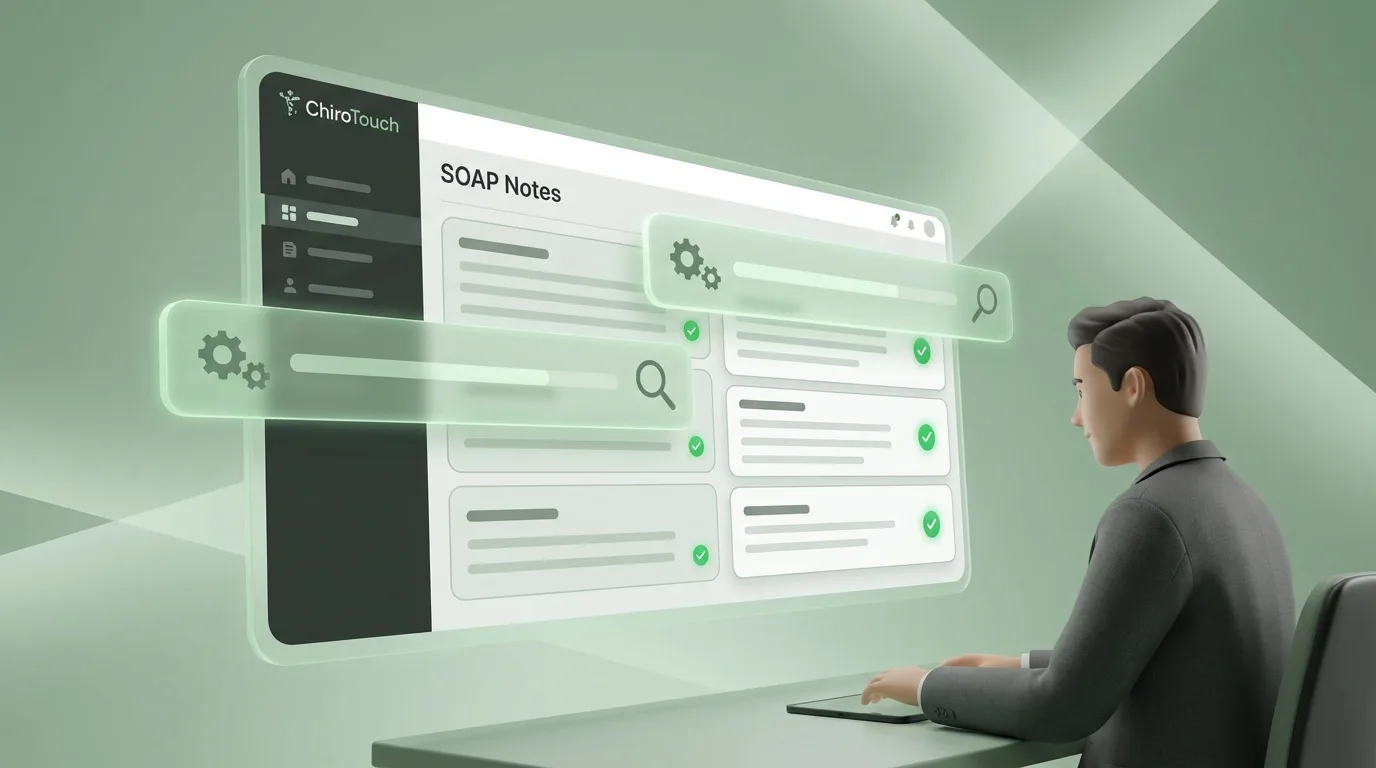
Rheo is ChiroTouch’s built-in AI assistant, and it’s one of the more practical additions the platform has made in recent years. Launched in mid-2025, Rheo is included at no additional cost with every ChiroTouch subscription and is designed specifically for chiropractic workflows.
For billing, Rheo helps in two important ways.
Documentation Speed and Accuracy
Rheo’s AI Scribe listens during patient encounters and generates structured, compliant SOAP notes in real time. ChiroTouch reports that early users are seeing up to a 92 percent reduction in documentation time – from an average of eight and a half minutes per note down to about 42 seconds.
Why does that matter for billing? Because in most chiropractic practices, documentation is where the billing timeline starts. Claims can’t go out until notes are complete. When providers fall behind on documentation – which happens easily in a high-volume week – claims stack up. And when claims stack up, Days in AR climb.
Rheo helps close that gap by producing review-ready notes during the visit itself. The provider checks the note, makes adjustments if needed, and approves it. The note syncs to the chart. Billing codes populate. And the claim is ready for scrubbing and submission that same day.
That shift – from finishing notes after hours to completing them in real time – is what makes same-day claim submission realistic instead of aspirational.
Compliance Scan: A Built-In Safety Net
This is where Rheo connects directly to your claim acceptance rate.
Rheo’s Compliance Scan reviews your documentation and billing codes for potential gaps, mismatches, and compliance issues before claims leave your office. It can flag things like insufficient medical necessity language, coding inconsistencies, and documentation that doesn’t fully support the billed services.
It’s essentially an automated pre-submission review. Instead of relying on one person to catch every documentation issue across dozens of claims, Rheo provides a consistent check on every encounter.
This works well alongside human intelligence in billing, not as a replacement for it. Rheo catches the systematic, pattern-level issues. A skilled biller handles the judgment calls – appeals, payer-specific nuances, and the situations that require a conversation rather than an algorithm.
The two together are stronger than either one alone.
What Rheo Doesn’t Cover (Yet)
It’s worth being straightforward about where Rheo’s capabilities currently end. As of early 2026, Rheo handles:
- Documentation – AI Scribe for voice-to-SOAP notes and intake summarization
- Compliance scanning – Pre-submission review of coding and documentation gaps
- Chart summaries – Patient progress snapshots for quicker clinical decisions
Features like the Scheduling Assistant and expanded Chart Note Assistant are still being rolled out.
What Rheo doesn’t cover yet:
- Claims management after submission
- Appeal writing and denial follow-up
- AR aging review and payer negotiation
Rheo makes the front end of billing faster and more accurate. That’s genuinely valuable. But the back end – denial management, follow-up, payer communication – still requires experienced human oversight. Billing shouldn’t feel like a mystery novel, but the post-submission side of it does require someone who knows how to read between the lines.
Configuring Your Clearinghouse for Reliable Submissions
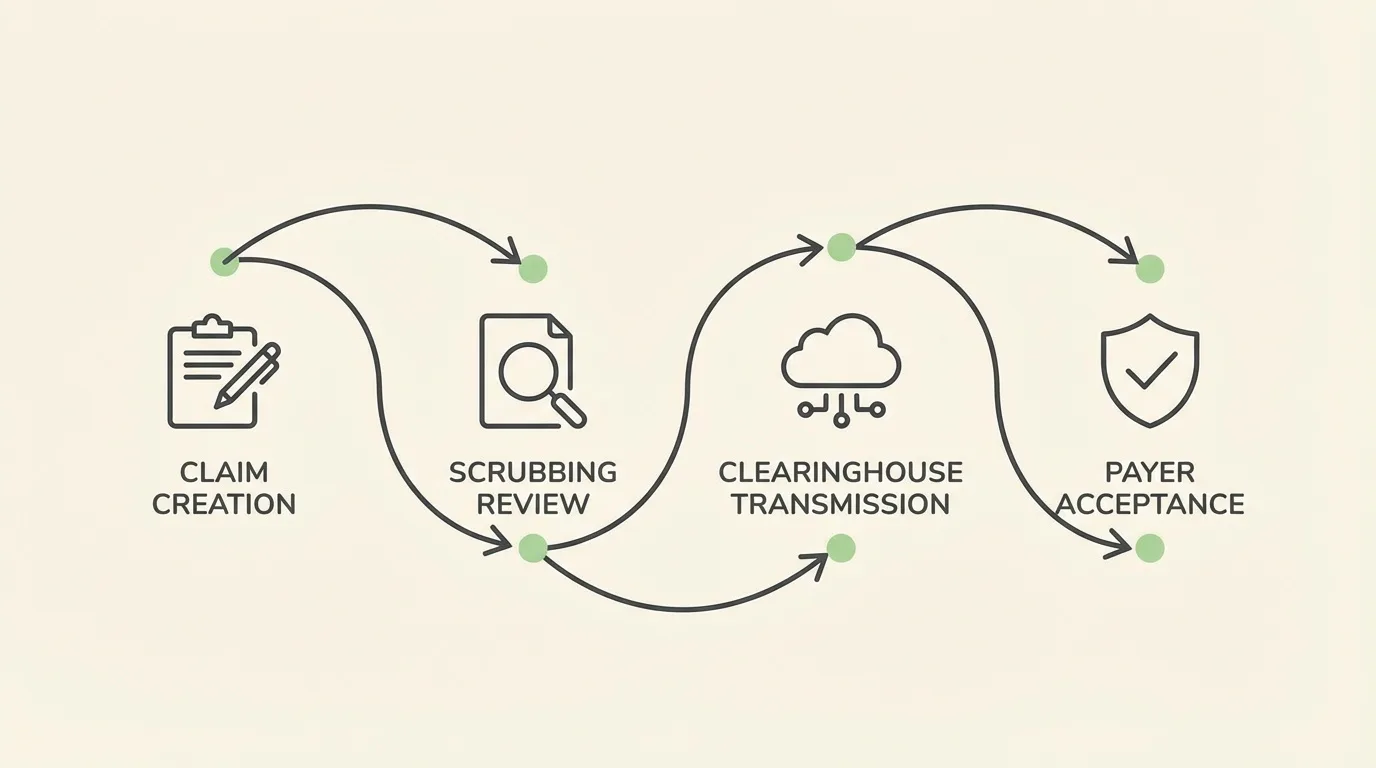
Your clearinghouse is the bridge between ChiroTouch and the insurance payer. When it’s set up correctly, claims move through cleanly and quickly. When it’s not, even well-documented claims can get held up.
ChiroTouch offers two primary clearinghouse integrations: CT ProClear (powered by TriZetto) and CT MaxClear (powered by Change Healthcare). Both are available to ChiroTouch Advanced subscribers.
Getting CT ProClear Set Up Correctly
CT ProClear automates claim submissions, includes built-in claim scrubbing, and automatically posts ERA data back to patient accounts. ChiroTouch reports that practices using the integrated clearinghouse can achieve up to a 98 percent payer acceptance rate.
Here’s what needs to be configured to get there:
- Trading partner credentials – Your TriZetto SFTP password and Interchange Receiver ID need to be entered accurately in the Accounting module under Maintenance > Trading Partners. Incorrect credentials are one of the most common reasons claims don’t transmit properly, and it’s an easy thing to overlook during setup.
- Payer registration – Every payer you bill needs to be registered with the correct Primary and Secondary IDs specific to TriZetto. Each clearinghouse maintains its own payer ID registry, and mismatched IDs can cause claims to fail without an obvious error message.
- ERA auto-posting – This is the feature we see left unconfigured most often. When it’s turned on, CT ProClear automatically applies electronic remittance advice to patient accounts, which removes the manual payment posting that takes up hours of staff time each week.
- Claim scrubbing edits – ProClear’s built-in scrubber checks claims against payer rules before submission. But these edits need to stay current. Make sure your TriZetto portal settings are synced and your SFTP connection is active.
First-Pass Yield vs. Clean Claim Rate: Why Both Matter
These two metrics sound similar, but they measure different things, and understanding the difference helps you troubleshoot more effectively.
Clean claim rate measures the percentage of claims that pass through your clearinghouse edits without needing manual fixes. The industry benchmark is 95 percent.
First-pass yield measures the percentage of claims that actually get paid on first submission. The industry standard is 85 percent, with well-run practices reaching 92 percent or higher.
Here’s why this matters: you can have a high clean claim rate and still have claims getting denied by payers. That means the clearinghouse is doing its job – claims are transmitting without formatting errors – but payers are rejecting them for other reasons, like insufficient medical necessity documentation, missing prior authorizations, or outdated fee schedules.
| KPI METRIC | DEFINITION | BENCHMARK | WHAT IT INDICATES |
|---|---|---|---|
| Clean Claim Rate | Claims passing edits without manual fixes | 95%+ | Your submission accuracy |
| First-Pass Yield | Claims paid on first submission | 85-92% | Your actual revenue speed |
| Days in AR | Average days to receive payment | Under 30-45 | Your cash flow health |
| Denial Rate | Claims rejected by payers | Under 10% | Your documentation and coding quality |
A Step-by-Step Approach to Optimizing Your Workflow
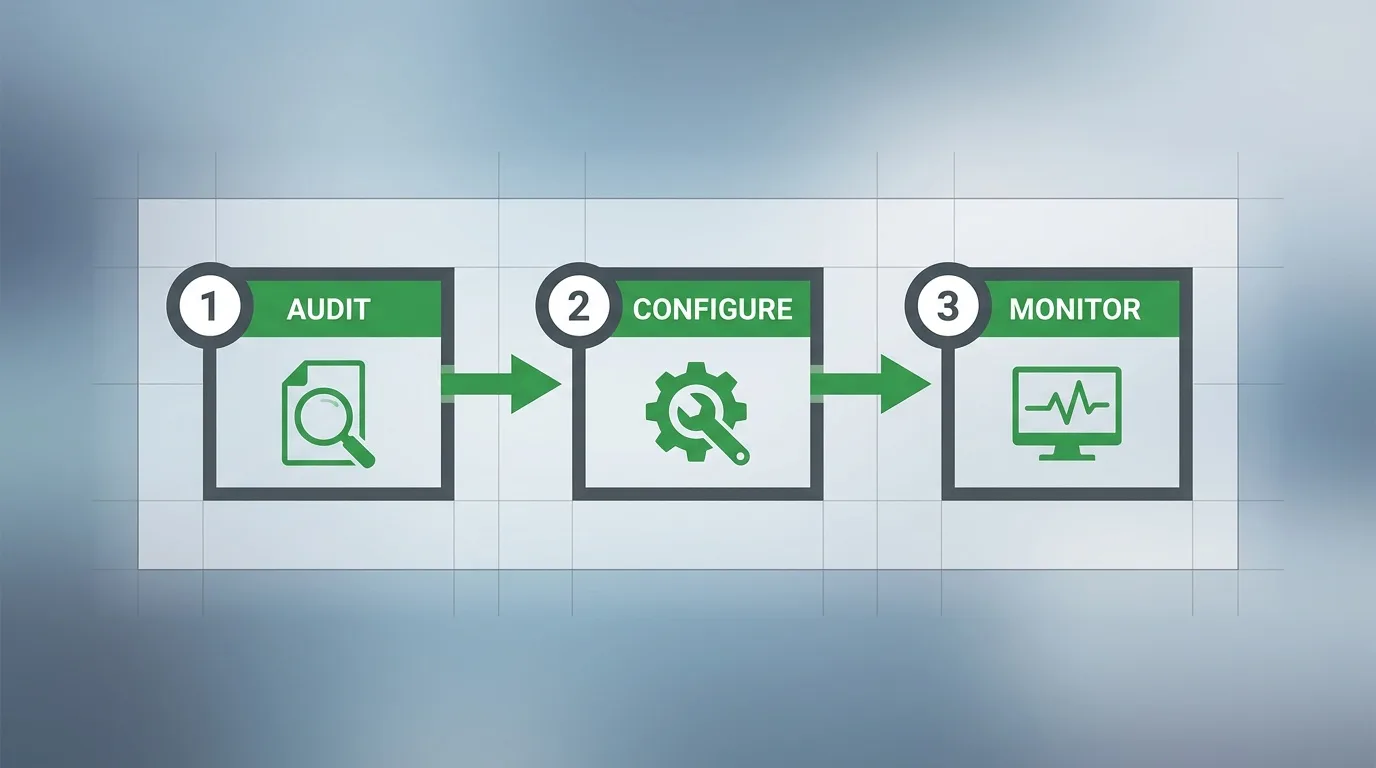
Step 1: Start with an Audit of What You Have
Before changing anything, take a clear look at your current configuration. Review your macros, code bundles, trading partner settings, and ERA setup. Make a note of which features are turned on and which are sitting dormant.
This step often uncovers things that aren’t immediately obvious. Practices that migrated from server to cloud sometimes find that clearinghouse settings didn’t carry over completely. Others discover macros that were built for payer rules that have since changed.
If you’re not sure what to look for, a billing audit from an experienced team can help you identify the specific gaps that are affecting your claims. It’s a practical starting point.
Step 2: Turn On Rheo AI
If you’re on ChiroTouch Cloud and haven’t activated Rheo yet, this is a good place to focus your energy. Contact ChiroTouch support to enable it for your account.
Start with the AI Scribe for voice-to-note documentation during patient visits. Then turn on Compliance Scan so your documentation gets reviewed for potential issues before claims are generated.
The goal is to close the gap between the patient visit and a claim-ready note. When documentation is complete and reviewed before the patient leaves the office, same-day submission becomes a natural part of the workflow instead of something your team is trying to catch up on.
Step 3: Review Your Clearinghouse Configuration
Confirm that CT ProClear or CT MaxClear is configured correctly. Check your trading partner credentials, make sure payer registrations are current, and enable ERA auto-posting if it isn’t already running.
It helps to test the submission pathway with a small batch of claims to make sure everything transmits end to end. Watch the Claims Worklist for any rejections that point to configuration issues rather than documentation problems.
Activate CT Verify to check patient insurance eligibility and benefits before every visit. This is one of the most reliable ways to prevent denials caused by inactive coverage, incorrect subscriber information, or benefits that have changed since the patient’s last appointment.
Eligibility verification errors are consistently among the top causes of claim denials across healthcare. Catching them at check-in instead of finding out after submission saves weeks of follow-up.
Step 4: Set Up Eligibility Verification
Weekly batch billing is one of the most common reasons practices see higher Days in AR than expected. Every day a claim sits unsubmitted is a day added to your revenue cycle.
ChiroTouch’s Claims Worklist gives you a centralized view of claim status, rejections, and items that need follow-up. Reviewing it daily – even if it’s just a quick 15-minute check – keeps claims moving and helps your team catch issues before they age.
When documentation happens in real time and claims go out the same day, you’re taking the shortest available path from service to payment.
Step 5: Build Payer-Specific Macros
Create dedicated macros for your most common payers. These should automatically apply required modifiers, set the correct place-of-service codes, and enforce payer-specific documentation requirements.
For Medicare chiropractic claims specifically, your macros should automatically append the AT modifier to spinal manipulation codes (98940, 98941, 98942). Medicare only covers chiropractic manipulation for active treatment of subluxation, and a missing AT modifier means an automatic denial.
For 2026, the Medicare conversion factor increased to $33.40 for non-APM participants and $33.57 for qualifying APM participants – a 3.26 and 3.77 percent increase respectively. Accurate coding on every Medicare claim matters even more when each claim carries slightly more value.
Step 6: Move to Daily Claims Worklist Reviews
Weekly batch billing is one of the most common reasons practices see higher Days in AR than expected. Every day a claim sits unsubmitted is a day added to your revenue cycle.
ChiroTouch’s Claims Worklist gives you a centralized view of claim status, rejections, and items that need follow-up. Reviewing it daily – even if it’s just a quick 15-minute check – keeps claims moving and helps your team catch issues before they age.
When documentation happens in real time and claims go out the same day, you’re taking the shortest available path from service to payment.
Step 7: Track Your Numbers Monthly
Pick four metrics and check them at the end of every month:
- Days in AR – A healthy target is under 30, with less than 10 percent of claims sitting past 90 days.
- Clean claim rate – 95 percent or higher is the benchmark.
- First-pass yield – 90 percent or higher means your pre-submission process is working well.
- Denial rate – Under 10 percent. Industry data shows initial claim denials reached 11.8 percent in 2024, so even “average” leaves room for improvement.
Use ChiroTouch’s reporting features to pull these numbers. If a metric starts trending the wrong direction, trace it back to the specific step in your workflow where the issue is likely starting.
| CHIROTOUCH FEATURE | WHAT IT DOES FOR BILLING | HOW IT HELPS |
|---|---|---|
| Rheo AI Scribe | Voice-to-SOAP documentation | Keeps notes current so claims go out same-day |
| Rheo Compliance Scan | Pre-submission coding and documentation review | Catches issues before they become denials |
| CT ProClear / MaxClear | Automated clearinghouse submission and scrubbing | Reduces transmission delays and formatting errors |
| CT Verify | Real-time insurance eligibility checks | Prevents coverage-related denials at the front desk |
| ERA Auto-Posting | Automated payment posting from remittance data | Removes manual payment entry bottleneck |
| Claims Worklist | Centralized claim tracking dashboard | Supports daily review and faster follow-up |
| Macro Libraries | Payer-specific coding automation | Keeps modifiers and codes accurate by payer |
Where Software Ends and Expertise Begins

There’s an important distinction that sometimes gets lost when we talk about optimizing software. ChiroTouch is an EHR and practice management platform. It’s built to create documentation, generate claims, and send them to payers.
What happens after submission – that’s a different set of skills.
The Post-Submission Side
When a claim gets denied, ChiroTouch can show you the denial code. But it can’t interpret why that specific payer denied that specific claim for that specific patient. It can’t draft an appeal that addresses the payer’s stated reason while framing the medical necessity argument in the way that actually gets results. It can’t pick up the phone to resolve a processing error.
This is where the idea of active revenue defense comes in. Software handles the systematic, repeatable parts of billing reliably. But the judgment-intensive work – denial analysis, appeal strategy, payer communication, AR recovery – requires people with experience doing exactly that.
When Configuration Alone Isn’t the Answer
If your practice is dealing with any of the situations below, optimizing your ChiroTouch setup will help, but it won’t fully resolve the underlying issue on its own:
- A significant percentage of claims aging past 60 days – This usually points to a follow-up gap, not a submission problem. Claims that are out the door but not being tracked and worked consistently will age regardless of how clean they were when they left.
- The same denial reason codes showing up repeatedly – Recurring patterns like this need root-cause analysis. Something systematic is happening – maybe a documentation template is missing a key element, or a payer changed its requirements and nobody caught it.
- Medicare denials related to medical necessity – These require thoughtful appeal language from someone who understands how peer reviewers evaluate chiropractic claims. A form letter usually won’t get it done.
- Turnover in your billing staff – Every time a biller leaves, the knowledge they had about your payer relationships, denial patterns, and workaround processes leaves with them. That’s a hard thing to rebuild quickly.
A well-configured ChiroTouch setup gets claims out faster and cleaner. That’s genuinely valuable, and it’s worth doing. But the full revenue cycle – from service to payment – has a back half that requires experienced hands.
| BILLING TASK | SOFTWARE HANDLES WELL | BENEFITS FROM HUMAN EXPERTISE |
|---|---|---|
| Documentation | AI-assisted SOAP notes | Medical necessity language and clinical context |
| Claim Scrubbing | Automated edit checks | Payer-specific nuances and rule changes |
| Submission | Electronic clearinghouse delivery | Follow-up on stalled or unacknowledged claims |
| Payment Posting | ERA auto-posting | Identifying underpayments and contract variances |
| Denial Management | Aging report generation | Prioritization, payer outreach, and recovery plans |
Frequently Asked Questions
How do I set up automated claim scrubbing in ChiroTouch Cloud?
You’ll need CT ProClear or CT MaxClear activated within your ChiroTouch Advanced subscription. From there, navigate to your clearinghouse settings in the Accounting module, configure your TriZetto or Change Healthcare trading partner credentials, and register your payer IDs.
Once connected, every claim runs through built-in edits before it reaches the payer. These edits catch common errors like missing modifiers, incorrect demographics, and diagnosis-procedure mismatches.
The step most practices miss is keeping payer registrations current. When a payer changes its ID or requirements, those updates need to be reflected in your trading partner setup. A quick quarterly review of your payer list is a good habit.
What is ChiroTouch Rheo AI and how does it help with billing?
Rheo is ChiroTouch’s built-in AI assistant, included at no extra cost with every subscription. For billing, Rheo’s Compliance Scan reviews your documentation and billing codes for potential gaps before claims are submitted.
It also generates structured SOAP notes through voice-to-text, which significantly reduces the time between patient visit and claim-ready documentation. Better documentation upstream means cleaner claims and fewer denials downstream.
Rheo was purpose-built for chiropractic and is trained on data from over 160 million patient encounters across more than 12,500 practices.
Why are my claims delayed even with integrated TriZetto billing?
The integrated clearinghouse handles the transmission side of the process. But if documentation templates are incomplete, macros are outdated, or ERA auto-posting isn’t turned on, claims can still move slowly.
Common reasons include unregistered payer IDs, missing AT modifiers on Medicare claims, unverified patient eligibility, and SOAP notes that don’t include the medical necessity language payers look for. The clearinghouse ensures delivery. Claim quality starts at the point of documentation.
How do I reduce my Days in AR to under 30 using ChiroTouch?
Getting below 30 requires attention to both ends of the billing cycle. On the front end, use CT Verify for eligibility checks before visits, run Rheo’s Compliance Scan before submission, and configure ERA auto-posting to remove manual payment entry delays.
On the back end, review your Claims Worklist daily rather than weekly. Focus first on claims approaching the 30-day mark. A professional billing partner can help by managing denial follow-up and appeals so your in-house team can stay focused on clean submissions.
Can ChiroTouch automate the AT modifier for Medicare chiropractic claims?
Yes. You can configure macros and code bundles in ChiroTouch that automatically append the AT modifier to spinal manipulation codes (98940, 98941, 98942) when billing Medicare for active treatment.
This is an important one to set up because Medicare only covers chiropractic manipulation for active, corrective treatment of subluxation. A missing AT modifier results in an automatic denial, and it’s completely preventable with the right macro configuration.
Is ChiroTouch Cloud faster than the server-based version for billing?
For billing workflows specifically, Cloud does offer clear advantages. Automatic updates, Rheo AI integration, and direct API connections to clearinghouses eliminate the SFTP file transfer delays that are common with server-based setups. Cloud also supports remote access, so billing can happen from any location without VPN configuration.
The server version isn’t receiving major new feature development at this point, which means the difference in capability will continue to grow over time. If you’re currently on the server version, it’s worth exploring what the cloud migration process would look like for your practice.
What should my first-pass claim acceptance rate be with ChiroTouch?
With CT ProClear’s integrated claim scrubbing, ChiroTouch reports up to a 98 percent payer acceptance rate. Industry benchmarks set the clean claim rate standard at 90 percent or higher and first-pass yield at 85 to 90 percent.
If you’re consistently below 90 percent, the issue is almost always in the pre-submission workflow – documentation quality, modifier accuracy, and eligibility verification are the three areas to check first.
Moving Forward
ChiroTouch has the tools to support a fast, organized billing workflow. Rheo AI, integrated clearinghouses, automated scrubbing, real-time eligibility checks – the infrastructure is solid.
What makes the difference is how that infrastructure is configured, maintained, and supported. The practices running low Days in AR with high clean claim rates aren’t using different software. They’re using the same platform with a more systematic approach to setup and ongoing billing management.
If your ChiroTouch workflow hasn’t been reviewed in a while, this is a good time to take a fresh look.
If you’ve been meaning to clean up your ChiroTouch billing workflow but haven’t had the time to dig into it, you’re in good company. Most of the practices we work with were in the same spot before they asked for a second set of eyes.
If you’re thinking “this all makes sense, but I don’t have time to figure it out,” you’re not alone. Most clinic owners we work with felt the same way before they realized how much revenue was slipping through the cracks.
That’s why we offer a free discovery call. It’s a chance to talk through your current billing situation and get clarity on what’s working, what’s not, and what your options are.
We’ll help you understand:
- Where your claims might be getting stuck
- What’s causing denials or delays
- Whether your AR is healthy or needs attention
- How your current process compares to best practices
- What a partnership with Bushido would actually look like
Book a Call – no pressure, no obligation, just a straightforward conversation about your billing.
Because the sooner your billing setup is working the way it should, the sooner you can stop thinking about claims and get back to focusing on your patients.

© . All Rights Reserved | Web Design by iTech Valet